Running Claude Code on a Local Model, with Automatic Local/Cloud Swapping
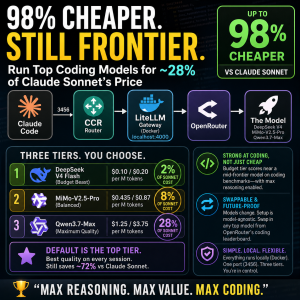
I want to preface this guide with I was hoping this would be a cheap way to run claudecode without spending a fortune on tokens. But after using it a little, the local LM hallucinates too much to be used on tasks that are more than very simple jobs like doing a handful of functions in 1 file. Once it branches across multiple it started adding its own features not based on my request making it useless for what I want. I’ve since created a new setup that works flawlessly and runs at 15% of the cost using a model that is better for programing than sonnet 4.6.
Warning Over – Onto the guide
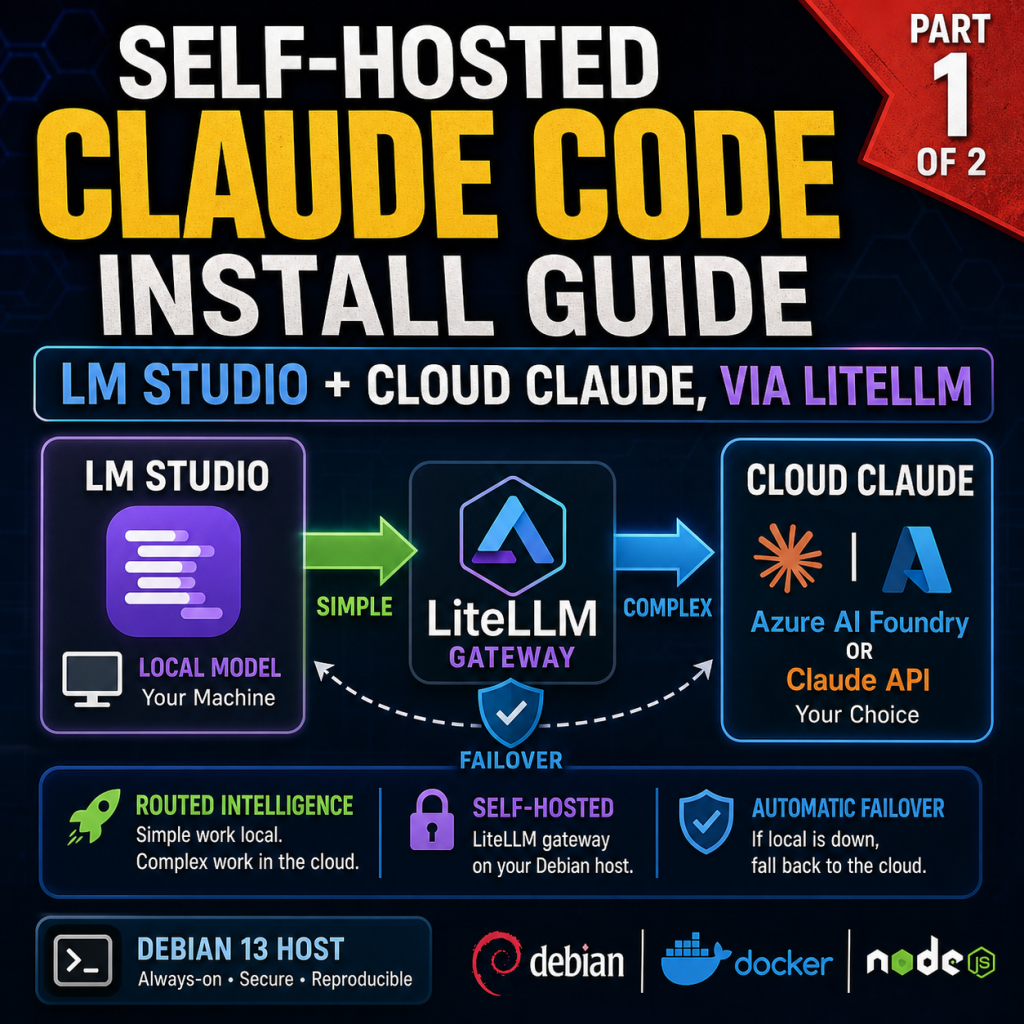
A reproducible build of an always-on Claude Code environment on a Debian host that runs against a local LM Studio model, with automatic swapping to a cloud Claude backend for the work the local model should not handle. You can run entire sessions locally, let Claude Code automatically hand its background work to the local model while a cloud model drives the foreground, and fail over to the cloud automatically if the local server goes down. A LiteLLM gateway sits in the middle and makes the local/cloud swapping and failover possible.
For the cloud side of the swap, you can use either backend:
- Claude API (Anthropic direct), or
- Azure AI Foundry (Claude models hosted in your Azure tenant).
Both are documented below. The local (LM Studio) half is identical in either case.
Every command block is labeled with where it runs and who runs it, e.g. [host / claude].
Prefer to skip the manual steps?
This guide ships with an optional interactive installer, install-claude-code-routing.sh, that automates the whole setup for you. Run it as your service user on the host and it walks you through a series of prompts (each with an example), asking for the handful of values unique to your environment, such as your LM Studio address, your cloud Claude key, and your model names. It even queries LM Studio for its loaded models and lets you pick one from a list. From there it installs rootless Docker, the toolchain, and Claude Code; writes your secrets file and the LiteLLM gateway config; starts the gateway; smoke-tests both the local and cloud paths; and adds the claude-routed and claude-local commands to your shell. Every step asks for confirmation first, existing files are backed up before anything is replaced, and the script is safe to re-run. If you would rather understand each piece as you go, follow the manual phases below instead; the installer simply performs those same steps for you.
How to read this guide
Context line format:
[host / claude] means: run on the Debian host, logged in as the claude user.
Locations referenced:
- host = the always-on Debian 13 machine that runs Claude Code (a VM or a dedicated box).
- client PC = the computer you connect from (PowerShell examples assume Windows).
- LM Studio box = the machine running LM Studio (any OS; CPU, Apple Silicon, or GPU all work; can be the same as the client PC).
- Azure portal / Claude Console = the relevant web console for your cloud backend.
VM users:
- root = system provisioning only (early setup steps).
- claude = the unprivileged service account that runs the agent and everything after.
Golden rule: after the user is created, always connect by SSH as claude, never with su. Rootless Docker and per-user services need a real login session, which su does not provide.
Placeholders to substitute
Replace these throughout with your own values.
| Placeholder | Meaning | Example |
|---|---|---|
<HOST_LOCAL_IP> | The Debian host’s LAN IP | 192.168.1.10 |
<LMSTUDIO_IP> | The LM Studio box’s LAN IP | 192.168.1.20 |
<LMSTUDIO_PORT> | LM Studio server port | 1234 |
<LOCAL_MODEL_ID> | LM Studio model id (from /v1/models) | qwen/qwen3.6-35b-a3b |
<FOUNDRY_RESOURCE> | Azure Foundry resource name (the subdomain) | myfoundry |
<SONNET_DEPLOYMENT> | Your Foundry Sonnet deployment name | claude-sonnet-4-6 |
<OPUS_DEPLOYMENT> | Your Foundry Opus deployment name | claude-opus-4-8 |
<HAIKU_DEPLOYMENT> | Your Foundry Haiku deployment name | claude-haiku-4-5 |
What you need before starting
- An always-on Debian 13 (“Trixie”) host (a VM or a dedicated machine) with roughly 4 to 6 vCPU, 16 GB RAM, and 80 to 120 GB disk.
- A machine running LM Studio 0.4.1 or later (this is your local-model backend; any platform LM Studio supports, on CPU or GPU).
- One cloud Claude backend: either an Azure AI Foundry resource with Claude deployments and an API key, or a Claude API key from the Anthropic Console.
- A client PC with an SSH client (built-in OpenSSH on Windows 10/11, or PuTTY).
This guide assumes the Debian host already exists and is reachable on your LAN. Host provisioning (hypervisor setup, VM creation, etc.) is intentionally out of scope so the focus stays on Claude Code.
Phase 1: Base system
[host / root]
apt update && apt -y full-upgrade
apt -y install \
  ca-certificates curl wget gnupg git \
  build-essential ripgrep jq htop tmux \
  unattended-upgrades python3 python3-venv pipx
timedatectl set-timezone America/Los_Angeles # change to your timezone
Optional: host hardening
Not required for Claude Code, but recommended because this host runs an always-on agent reachable over your network:
[host / root]
apt -y install fail2ban nftables
- fail2ban watches authentication logs and temporarily bans IP addresses after repeated failed SSH logins, which blunts brute-force attempts against the box.
- nftables is the Linux firewall; you can use it to restrict inbound access to your LAN only (relevant once SSH is exposed).
Skip these if your host is already firewalled upstream or you manage hardening through your own conventions.
Phase 2: Create the claude service user
[host / root]
adduser --gecos "" claude
usermod -aG sudo claude
loginctl enable-linger claude
- Set a password when
adduserprompts. usermod: no changesjust means the user was already insudo. Fine.enable-lingerlets this user’s services run without an active login and start at boot. It is required for rootless Docker.
Confirm:
groups claude                                # should include: sudo
loginctl show-user claude | grep Linger      # should print: Linger=yes
If adduser/usermod report command not found: your root shell lacks /usr/sbin on PATH (non-login shell). Run export PATH="/usr/local/sbin:/usr/local/bin:/usr/sbin:/usr/bin:/sbin:/bin" and use a login shell.
Phase 3: SSH key access
3a. Generate a key (if needed)
[client PC / PowerShell]
ssh-keygen -t ed25519 -f $env:USERPROFILE\.ssh\id_ed25519
Press Enter through the prompts (a passphrase is recommended). Creates id_ed25519 (private) and id_ed25519.pub (public) in C:\Users\<you>\.ssh\.
3b. Copy the public key to the host
[client PC / PowerShell]
type $env:USERPROFILE\.ssh\id_ed25519.pub | ssh claude@<HOST_LOCAL_IP> "mkdir -p ~/.ssh && chmod 700 ~/.ssh && cat >> ~/.ssh/authorized_keys && chmod 600 ~/.ssh/authorized_keys"
Enter the claude password once when prompted.
Shell note: $env:USERPROFILE is PowerShell only; in CMD use %USERPROFILE%. Do not run this inside a PuTTY session (PuTTY connects you to the host; it is not where you run local Windows commands). For PuTTY, convert the key to .ppk with PuTTYgen and set it under Connection > SSH > Auth > Credentials.
3c. Test key login
[client PC / PowerShell]
ssh claude@<HOST_LOCAL_IP>
If it logs in without a password prompt, the key works.
Hardening (PasswordAuthentication no) is deferred. Key and password auth coexist; lock down later, only after confirming key login from every device, so you do not lock yourself out.
All remaining host commands are run after ssh claude@<HOST_LOCAL_IP>.
Phase 4: Rootless Docker (for the LiteLLM gateway and container testing)
4a. Install Docker Engine
[host / claude] (system steps use sudo)
sudo install -m 0755 -d /etc/apt/keyrings
sudo curl -fsSL https://download.docker.com/linux/debian/gpg -o /etc/apt/keyrings/docker.asc
sudo chmod a+r /etc/apt/keyrings/docker.asc
echo "deb [arch=$(dpkg --print-architecture) signed-by=/etc/apt/keyrings/docker.asc] https://download.docker.com/linux/debian $(. /etc/os-release && echo $VERSION_CODENAME) stable" | sudo tee /etc/apt/sources.list.d/docker.list > /dev/null
sudo apt update
sudo apt -y install docker-ce docker-ce-cli containerd.io docker-buildx-plugin docker-compose-plugin uidmap dbus-user-session slirp4netns fuse-overlayfs
sudo systemctl disable --now docker.service docker.socket
Use ... | sudo tee for the repo line. sudo echo > /etc/... fails because the redirect runs as your shell, before sudo.
4b. Enable rootless mode for claude
[host / claude] (must be a real SSH login, not su)
dockerd-rootless-setuptool.sh install
systemctl --user enable --now docker
echo 'export PATH=/usr/bin:$PATH' >> ~/.bashrc
echo 'export DOCKER_HOST=unix:///run/user/$(id -u)/docker.sock' >> ~/.bashrc
source ~/.bashrc
The $(id -u) form resolves to your real UID automatically; do not hardcode it.
4c. Verify
[host / claude]
systemctl --user status docker     # expect: active (running)
docker run --rm hello-world        # expect: "Hello from Docker!"
If you see Failed to connect to user scope bus or a missing socket: you are in a su shell. Disconnect, ssh claude@<HOST_LOCAL_IP>, and re-run 4b.
Phase 5: Toolchain (mise, Node, Claude Code)
[host / claude]
curl https://mise.run | sh
echo 'eval "$(~/.local/bin/mise activate bash)"' >> ~/.bashrc
source ~/.bashrc
mise use -g node@22 python@3.12
node --version && python --version
Install Claude Code:
[host / claude]
curl -fsSL https://claude.ai/install.sh | bash
export PATH="$HOME/.local/bin:$PATH"
claude --version
claude doctor
Phase 6: Prepare LM Studio (LM Studio box)
On the machine running LM Studio:
- Developer / Server tab: start the server.
- Enable Serve on Local Network so the host can reach it.
- Load a tool-capable model of your choice. Pick one your hardware can run; for agentic coding, models trained for tool use behave best. Examples: a Qwen coder model (e.g.
qwen/qwen3.6-35b-a3b), a smaller Qwen or Llama variant for modest hardware, or any GGUF model LM Studio lists. Smaller/quantized models run fine on CPU or limited memory; larger ones need more RAM or VRAM. - Set context length to at least 32768 (32K). This is critical: Claude Code prompts are large (around 23k tokens), and the default 8192 context rejects them with
n_keep >= n_ctx. Set it as high as your available memory comfortably allows. - (Optional) Enable Require Authentication and note the token.
Confirm reachability and get the exact model id:
[host / claude]
curl http://<LMSTUDIO_IP>:<LMSTUDIO_PORT>/v1/models
Note the model id exactly; that is your <LOCAL_MODEL_ID>.
Phase 7: Prepare your cloud backend
Pick one (or set up both). This is the foreground/complex model.
Option A: Azure AI Foundry
In the Azure AI Foundry portal:
- Confirm Claude deployments exist and note their exact deployment names (these are names you chose, not canonical model IDs).
- Open Keys and Endpoint and note:
- The endpoint host, e.g.
https://<FOUNDRY_RESOURCE>.services.ai.azure.com/. The “resource name” is just the subdomain (<FOUNDRY_RESOURCE>), not the long/subscriptions/.../accounts/...resource ID. - One of the two API keys.
- The endpoint host, e.g.
You will use base URL https://<FOUNDRY_RESOURCE>.services.ai.azure.com/anthropic and that key.
Option B: Claude API (Anthropic direct)
In the Anthropic Console:
- Create an API key (begins with
sk-ant-...). - Note the model IDs you want to use, for example
claude-sonnet-4-6,claude-opus-4-8,claude-haiku-4-5.
The Claude API is the native path, so it has none of the auth/header quirks Foundry has. It bills your Anthropic account per token at standard API rates.
Phase 8: Secrets file
[host / claude] Include only the keys for the backend(s) you are using.
umask 077
cat > ~/.config/claude-secrets.env <<'EOF'
# LiteLLM gateway master key (invent a strong string)
LITELLM_MASTER_KEY=sk-local-CHANGE_ME

# Option A (Foundry): your Foundry API key
AZURE_API_KEY=PASTE_FOUNDRY_KEY

# Option B (Claude API): your Anthropic key, under a DISTINCT name (see warning)
ANTHROPIC_DIRECT_KEY=PASTE_ANTHROPIC_KEY
EOF
chmod 600 ~/.config/claude-secrets.env
Auto-load secrets in every shell:
[host / claude]
echo '[ -f ~/.config/claude-secrets.env ] && set -a && . ~/.config/claude-secrets.env && set +a' >> ~/.bashrc
source ~/.bashrc
echo "[$LITELLM_MASTER_KEY]"   # should print non-empty
Critical naming rule: the Anthropic key is stored as ANTHROPIC_DIRECT_KEY, never as ANTHROPIC_API_KEY. This secrets file is auto-loaded into every shell with set -a (export). If you named it ANTHROPIC_API_KEY, it would silently switch your subscription mode to paid API billing and bypass the gateway in routed mode. Keep the direct key under its own name and let only LiteLLM read it.
Phase 9: LiteLLM gateway
9a. Write the config
[host / claude] Use the local block plus the cloud block for your chosen backend. You may include both cloud blocks if you set up both.
mkdir -p ~/litellm
cat > ~/litellm/config.yaml <<'EOF'
model_list:
  # ---- Local (background/simple): LM Studio on your local machine ----
  - model_name: local
    litellm_params:
      model: lm_studio/<LOCAL_MODEL_ID>
      api_base: http://<LMSTUDIO_IP>:<LMSTUDIO_PORT>/v1
      api_key: "lm-studio"          # dummy unless LM Studio auth is enabled

  # ===== Option A: Azure Foundry Claude =====
  - model_name: foundry-sonnet
    litellm_params:
      model: azure_ai/<SONNET_DEPLOYMENT>
      api_base: https://<FOUNDRY_RESOURCE>.services.ai.azure.com/anthropic
      api_key: os.environ/AZURE_API_KEY
  - model_name: foundry-opus
    litellm_params:
      model: azure_ai/<OPUS_DEPLOYMENT>
      api_base: https://<FOUNDRY_RESOURCE>.services.ai.azure.com/anthropic
      api_key: os.environ/AZURE_API_KEY
  - model_name: foundry-haiku
    litellm_params:
      model: azure_ai/<HAIKU_DEPLOYMENT>
      api_base: https://<FOUNDRY_RESOURCE>.services.ai.azure.com/anthropic
      api_key: os.environ/AZURE_API_KEY

  # ===== Option B: Claude API (Anthropic direct) =====
  - model_name: claude-sonnet
    litellm_params:
      model: anthropic/claude-sonnet-4-6
      api_key: os.environ/ANTHROPIC_DIRECT_KEY
  - model_name: claude-opus
    litellm_params:
      model: anthropic/claude-opus-4-8
      api_key: os.environ/ANTHROPIC_DIRECT_KEY
  - model_name: claude-haiku
    litellm_params:
      model: anthropic/claude-haiku-4-5
      api_key: os.environ/ANTHROPIC_DIRECT_KEY

litellm_settings:
  drop_params: true
  modify_params: true
  num_retries: 2
  request_timeout: 120
  # Failover: if LM Studio is down, fall back to a cheap cloud model.
  # Use whichever cloud backend you configured:
  fallbacks: [{"local": ["foundry-haiku"]}]      # or ["claude-haiku"] for Option B
EOF
Substitute every <...> placeholder. If you only configured one backend, delete the other option’s three entries. Set the fallbacks target to a model that actually exists in your config.
Foundry URL note: base must end in /anthropic with no trailing slash and no /v1/messages (LiteLLM appends it). Avoid a double slash.
9b. Run the gateway (rootless Docker)
[host / claude] Uses the official stable image (avoids the PyPI 1.82.7/1.82.8 malware advisory that affected pip installs). Pass only the keys you use.
docker run -d --name litellm --restart unless-stopped \
  -p 127.0.0.1:4000:4000 \
  -v ~/litellm/config.yaml:/app/config.yaml \
  -e LITELLM_MASTER_KEY="$LITELLM_MASTER_KEY" \
  -e AZURE_API_KEY="$AZURE_API_KEY" \
  -e ANTHROPIC_DIRECT_KEY="$ANTHROPIC_DIRECT_KEY" \
  docker.litellm.ai/berriai/litellm:main-stable \
  --config /app/config.yaml --port 4000
[host / claude] Confirm:
docker ps                       # litellm should be "Up"
docker logs --tail 20 litellm   # no YAML parse error / traceback
Reload after config edits: docker restart litellm. Watch routing: docker logs -f litellm.
9c. Smoke-test the backends
[host / claude] Local path:
curl -s http://127.0.0.1:4000/v1/messages \
  -H "Authorization: Bearer $LITELLM_MASTER_KEY" -H "Content-Type: application/json" \
  -d '{"model":"local","max_tokens":50,"messages":[{"role":"user","content":"say hi"}]}'
[host / claude] Cloud path (use foundry-sonnet for Option A or claude-sonnet for Option B):
curl -s http://127.0.0.1:4000/v1/messages \
  -H "Authorization: Bearer $LITELLM_MASTER_KEY" -H "Content-Type: application/json" \
  -d '{"model":"claude-sonnet","max_tokens":50,"messages":[{"role":"user","content":"say hi"}]}'
Both must return JSON with a short reply.
401 Malformed API Key ... Ensure Key has 'Bearer ' prefix means LITELLM_MASTER_KEY was empty in that shell. Run source ~/.config/claude-secrets.env and retry.
Phase 10: Routed-mode launcher
10a. Isolated routed config
[host / claude]
mkdir -p ~/.claude-routed
cat > ~/.claude-routed/settings.json <<'EOF'
{
  "effortLevel": "high",
  "theme": "auto"
}
EOF
This file must not contain an env block or a pinned model; those override the launcher and cause requests to bypass the gateway. Use effortLevel: high (Foundry rejects xhigh).
10b. Launcher function
[host / claude] Set ANTHROPIC_MODEL to your chosen foreground model name: foundry-sonnet (Option A) or claude-sonnet (Option B).
cat >> ~/.bashrc <<'EOF'

claude-routed() {
  [ -f ~/.config/claude-secrets.env ] && set -a && . ~/.config/claude-secrets.env && set +a
  CLAUDE_CONFIG_DIR="$HOME/.claude-routed" \
  ANTHROPIC_BASE_URL="http://127.0.0.1:4000" \
  ANTHROPIC_AUTH_TOKEN="$LITELLM_MASTER_KEY" \
  ANTHROPIC_MODEL="claude-sonnet" \
  ANTHROPIC_DEFAULT_HAIKU_MODEL="local" \
  CLAUDE_CODE_ENABLE_GATEWAY_MODEL_DISCOVERY="1" \
  CLAUDE_CODE_DISABLE_EXPERIMENTAL_BETAS="1" \
  claude "$@"
}
EOF
source ~/.bashrc
type claude-routed     # should report: claude-routed is a function
What each setting does:
CLAUDE_CONFIG_DIRisolates routed mode from subscription mode.ANTHROPIC_BASE_URLpoints Claude Code at the LiteLLM gateway.ANTHROPIC_AUTH_TOKENcarries the LiteLLM master key (notANTHROPIC_API_KEY).ANTHROPIC_MODELis the foreground/main model (claude-sonnetorfoundry-sonnet).ANTHROPIC_DEFAULT_HAIKU_MODEL=localsends Claude Code’s background/housekeeping (the internal “haiku” slot) to LM Studio. This is the current, correct variable. Do not use the olderANTHROPIC_SMALL_FAST_MODEL, which Claude Code deprecated and now silently ignores (it was replaced byANTHROPIC_DEFAULT_HAIKU_MODEL). See the note below on how little this slot actually routes.CLAUDE_CODE_ENABLE_GATEWAY_MODEL_DISCOVERY=1lets Claude Code read the gateway’s model list.CLAUDE_CODE_DISABLE_EXPERIMENTAL_BETAS=1stops a beta header the gateway cannot forward, which otherwise fails with a misleading “model may not exist or you may not have access” error.
Define claude-routed as a function, not an alias. An alias and a function sharing the name causes syntax error near unexpected token '(' on shell load.
How much actually runs locally (read this)
With this configuration, only a small amount of work is routed to LM Studio automatically. Your prompts, the agent’s reasoning, file reads, tool calls, and code generation all go to the cloud foreground model. The only thing pointed at local is Claude Code’s internal haiku/background slot, which it uses for a few short housekeeping calls (such as generating a conversation title). It is narrow, and notably /compact does not use it (compaction runs on the main model). So in normal use you should expect the local model to handle very little, and most tokens to go to the cloud backend.
If you want meaningful work on the local model today, use forced-local mode (next section) rather than relying on the automatic split.
Coming later: a companion guide on complex routing (using claude-code-router in front of LiteLLM) will let you route by request type, so ordinary foreground work can also go local and the split becomes explicit and logged rather than limited to the haiku slot. Until then, the automatic local share is small by design.
Running Claude Code directly on LM Studio (forced-local mode)
This is the most useful way to actually put work on your local model today: point Claude Code’s main model at local so an entire session runs against LM Studio. It is great for simple or high-volume tasks where cloud-grade quality is not required, and it costs nothing but local compute.
Two ways to do it:
In-session switch (quickest). Inside any claude-routed session:
/model local
That routes the current session’s foreground work to LM Studio. Switch back with /model claude-sonnet (or /model foundry-sonnet). Confirm with the model’s own answer: ask “what model and company made you?” and it should identify as your local model (e.g. Qwen), and the request should appear in LM Studio’s server log.
Dedicated launcher (if you want a one-command local session). Add a second function alongside claude-routed:
[host / claude]
cat >> ~/.bashrc <<'EOF'

claude-local() {
  [ -f ~/.config/claude-secrets.env ] && set -a && . ~/.config/claude-secrets.env && set +a
  CLAUDE_CONFIG_DIR="$HOME/.claude-routed" \
  ANTHROPIC_BASE_URL="http://127.0.0.1:4000" \
  ANTHROPIC_AUTH_TOKEN="$LITELLM_MASTER_KEY" \
  ANTHROPIC_MODEL="local" \
  ANTHROPIC_DEFAULT_HAIKU_MODEL="local" \
  CLAUDE_CODE_ENABLE_GATEWAY_MODEL_DISCOVERY="1" \
  CLAUDE_CODE_DISABLE_EXPERIMENTAL_BETAS="1" \
  claude "$@"
}
EOF
source ~/.bashrc
Then claude-local runs an entire session on LM Studio, with the same failover to a cloud Haiku model if LM Studio is unavailable.
Quality expectation: local models are materially weaker than cloud Claude at agentic coding (tool calls, multi-file edits), so forced-local is best for simple edits, quick questions, boilerplate, and throwaway scripts. Keep complex, multi-step work on the cloud foreground model. This is the deliberate “send whole tasks local when I choose to” lever, as opposed to the small automatic background split above.
The LM Studio + Claude API combination (Option B in practice)
This is the “LM Studio for simple calls, Claude (not Azure) for complex calls” setup, summarized end to end:
- Phase 7 Option B: create a Claude API key.
- Phase 8: store it as
ANTHROPIC_DIRECT_KEY(distinct name, neverANTHROPIC_API_KEY). - Phase 9: keep the
localblock and the threeclaude-*(Option B) entries; you can delete thefoundry-*entries. Setfallbacks: [{"local": ["claude-haiku"]}]. - Phase 10b: set
ANTHROPIC_MODEL="claude-sonnet".
Result: foreground/complex turns go to the Claude API, background/simple turns go to LM Studio, and if LM Studio is down those background calls fall back to Claude Haiku. Because the cloud side is the native Claude API, this variant avoids the Foundry-specific quirks (role 'system', adaptive thinking, the Bearer-vs-x-api-key difference) entirely, so it is the cleanest of the three options to operate.
Even simpler (no split): if you ever want a pure Claude-API session with no local model at all, you do not need LiteLLM. Make a separate launcher that sets CLAUDE_CONFIG_DIR=~/.claude-api, ANTHROPIC_API_KEY="$ANTHROPIC_DIRECT_KEY", and nothing else, then run claude. Keep it in its own config dir so the key never leaks into subscription or routed mode. This is also a handy diagnostic baseline: if something misbehaves in routed mode, the same task in pure API mode tells you instantly whether the issue is Claude Code or your gateway.
Phase 11: Validation
[host / claude] Keep the gateway log open in one pane:
docker logs -f litellm
In another, launch and check status:
[host / claude]
claude-routed
Inside the session, run /status and confirm:
- Anthropic base URL:
http://127.0.0.1:4000 - Model: your foreground model (
claude-sonnetorfoundry-sonnet)
Then:
- Foreground to cloud: ask
write a hello world python script and run it. It should create and run the file; the gateway log shows the cloud model serving it. - Local model identity: run
/model haiku(resolves tolocal), then askWhat model and company made you?. It should identify as your local model (e.g. Qwen/Alibaba), and LM Studio’s server log should show the request. Switch back with/model claude-sonnet. - Failover: with a session running, stop LM Studio’s server, then trigger work routed to
local. The gateway should retry on the cloud Haiku model.
To confirm the local model is doing real work, run a verbose forced-local prompt and watch LM Studio’s server log (Developer/Server tab), which records every request including brief background ones. If your machine has a GPU and you want to see hardware load, your platform’s monitor (for example nvidia-smi -l 1 on NVIDIA, or Activity Monitor on macOS) will show utilization spike during generation and idle between calls. Background calls are often too short to register visibly, so the server log is the more reliable signal.
Subscription mode (the other mode)
You also have a separate subscription mode using your Claude Pro plan directly:
[host / claude]
claude # plain launch, Pro account via OAuth, uses ~/.claude
On a headless host the first login uses a device-code flow (prints a URL to open elsewhere and paste a code back).
Terms note: a Pro/Max subscription’s OAuth must not be routed through a gateway. Keep subscription mode first-party (plain claude); use routed mode for Foundry/Claude API/local only.
Daily command reference
[host / claude]
# Subscription mode (Pro plan, first-party)
claude

# Routed mode (cloud foreground + local background, via LiteLLM)
claude-routed

# Forced-local mode (entire session on LM Studio)
claude-local

# Gateway control
docker restart litellm        # reload after editing config.yaml
docker logs -f litellm        # watch routing live
docker start litellm          # if stopped
docker stop litellm           # stop

# In-session model switching
/status                       # show base URL + active model
/model claude-sonnet          # or foundry-sonnet; force cloud foreground
/model haiku                  # force local (resolves to LM Studio)
Known issues and caveats
role 'system' is not supported on this model(Foundry only): LiteLLM self-heals via retry (a 400 immediately followed by a 200). Cosmetic noise, non-blocking.modify_params: truereduces it. Does not occur on the Claude API path.adaptive thinking is not supported on this model(Foundry only): can appear on the failover path to Foundry Haiku; needs the thinking parameter disabled before that failover is fully reliable. Does not occur on the Claude API path.- Background-to-local visibility:
/compactuses the main model, not the background slot, so it hits the cloud, not LM Studio. That is expected. The background (haiku) slot is confirmed routable to local via/model haiku. - Local model quality: the local model is materially weaker than cloud Claude at agentic coding. Use it for simple/background work; keep complex work on the cloud backend.
- Key isolation: never put
ANTHROPIC_API_KEYin the auto-loaded secrets file; it would override subscription and routed modes. The direct Claude key lives asANTHROPIC_DIRECT_KEYand is read only by LiteLLM (or by a dedicated pure-API launcher in its own config dir). - Version sensitivity: Claude Code env-var behavior, LM Studio’s Anthropic endpoint, and cloud model catalogs change over time. Re-verify against current docs if behavior differs.
Quick troubleshooting map
| Symptom | Cause | Fix |
|---|---|---|
Failed to connect to user scope bus / missing docker socket | reached claude via su, not SSH login | disconnect, ssh claude@<HOST_LOCAL_IP>, re-run |
apt installed nothing | one unresolvable package name aborted the whole transaction | remove the unknown package name, re-run |
command not found: adduser | non-login root shell, no /usr/sbin on PATH | use a login shell / export full PATH |
Permission denied writing /etc/... as claude | system step run without sudo | prefix with sudo; use `… |
401 Malformed API Key ... Bearer | empty LITELLM_MASTER_KEY in shell | source ~/.config/claude-secrets.env |
| “model may not exist or you may not have access” | beta header not forwardable / stray base URL / empty token | set CLAUDE_CODE_DISABLE_EXPERIMENTAL_BETAS=1, clean settings.json, load secrets |
| Requests bypass gateway (base URL shows the cloud host) | env block / pinned model in ~/.claude-routed/settings.json | reduce settings.json to effort/theme only |
| Subscription mode unexpectedly billing API | ANTHROPIC_API_KEY set in the shell/secrets | rename the direct key to ANTHROPIC_DIRECT_KEY |
effort level 'xhigh' rejected (Foundry) | Foundry does not support xhigh | set effortLevel: high |
n_keep >= n_ctx from LM Studio | context window too small | load LM Studio model at >=32K context |
| Background never hits local | used deprecated ANTHROPIC_SMALL_FAST_MODEL | use ANTHROPIC_DEFAULT_HAIKU_MODEL |
syntax error near unexpected token '(' on shell load | alias and function share the name claude-routed | delete the alias line, keep the function |
About Author