Adding Difficulty-Based Routing with Claude Code Router
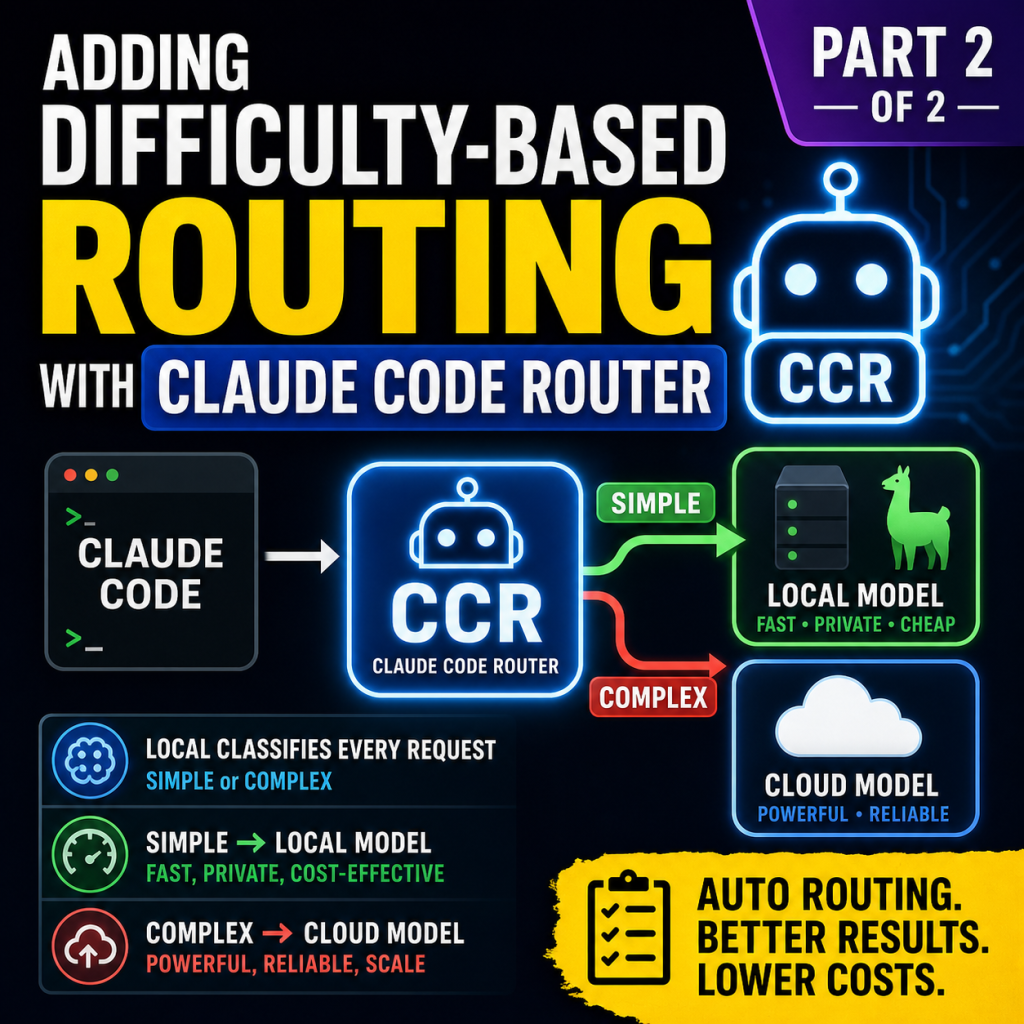
This guide adds a routing layer on top of a working LiteLLM gateway so that Claude Code sends simple requests to a local model and complex requests to a cloud model, with the decision made automatically per request. It assumes you already have the base setup described in the main install guide: Claude Code talking to a LiteLLM proxy that routes to a local model server and a cloud Claude backend.
Throughout this guide, values in square brackets like [LOCAL_MODEL_HOST] are placeholders. Replace each one, including the brackets, with your real value before running a command.
The piece this guide adds is Claude Code Router (CCR). LiteLLM on its own is a model-name router, not a difficulty router, so without CCR only the small background slot ever reaches the local model, and in practice almost nothing runs locally. CCR sits in front of LiteLLM, classifies each request as simple or complex using the local model, and routes accordingly. Cloud traffic still flows through your existing LiteLLM proxy, so all of the cloud authentication and request-shaping you already solved is reused unchanged.
What you will end up with
Claude Code points at CCR instead of LiteLLM. CCR runs a small classifier on every request using your local model. Simple requests go straight to the local model. Complex requests, plan-mode requests, and very long contexts go to the cloud model through your existing LiteLLM proxy. A custom router file makes the simple-versus-complex decision and writes a one-line record of every decision to a log you control. CCR runs as a managed service so it survives crashes and restarts.
One design note worth flagging up front: an earlier version of this router tried to force every tool-defining request to the cloud, on the theory that the local model cannot reliably round-trip tool calls. That guard was removed after testing, because Claude Code attaches its full tool array to nearly every turn, so the guard captured essentially all traffic and starved the local model. The router therefore does pure difficulty classification and leans on CCR’s cloud fallback to catch the occasional local tool-calling failure. Phase 5 explains the reasoning in full, so that nobody re-adds the guard by reflex.
Prefer to skip the manual steps?
This guide includes an interactive installer script that does everything below for you. Run it and it prompts for each value you would otherwise fill in by hand, showing an example for each, then validates your answers before using them: it pings your local model server to confirm it is reachable, checks that the model ID you enter is actually loaded, and verifies your cloud model names against what your gateway exposes. From there it installs Claude Code Router, writes its configuration, writes the difficulty router, adds the required fix to your existing gateway config (backing up the original first), and sets CCR up as a service that survives crashes and restarts. Every step that changes your system asks for confirmation first, and anything it edits is backed up beforehand, so it is safe to run and easy to reverse. A matching uninstaller script cleanly removes everything if you decide to back out. If your setup differs from the one described here, you can ignore the script and follow the manual phases below instead.
CCR Difficulty Routing Install – Script
Before you start
Confirm the base layer is healthy. Replace the placeholders with your real values throughout.
[LOCAL_MODEL_HOST]: the host and port of your local model server, for example[LOCAL_IP]:1234.[LOCAL_MODEL_ID]: the exact model identifier your local server reports.[CLOUD_SIMPLE_MODEL]and[CLOUD_COMPLEX_MODEL]: the LiteLLM model names for your cloud tiers, for example a haiku-class and a sonnet-class name.[SERVICE_USER]: the unprivileged user that owns the rootless container stack, for exampleclaude.
Quick health checks, run as the service user:
bash
# LiteLLM is up and reachable on loopback
curl -s http://127.0.0.1:4000/v1/models -H "Authorization: Bearer $LITELLM_MASTER_KEY" -o /dev/null -w "litellm: %{http_code}\n"

# The local model server is up and the expected model is loaded
curl -s http://[LOCAL_MODEL_HOST]/v1/models | python3 -c "import sys,json;[print(' -',m['id']) for m in json.load(sys.stdin).get('data',[])]"
You want a 200 from LiteLLM and your [LOCAL_MODEL_ID] listed by the local server. If either fails, fix that before continuing; CCR depends on both.e local server. If either fails, fix that before continuing; CCR depends on both.
Phase 1: Prepare the cloud path to accept routed requests
CCR adds request fields that some cloud backends reject. Before installing CCR, make LiteLLM strip those fields, otherwise every routed cloud request fails.
The fields to drop are reasoning, thinking, and enable_thinking. CCR derives these from Claude Code’s thinking settings, and strict cloud schemas reject them. Important detail: for some cloud providers the global drop setting does not apply, so the drop must be set at the model level inside each model’s parameters, not only in the global settings block.
Edit your LiteLLM config and add the drop list to each cloud model entry. The shape looks like this:
yaml
model_list:
  - model_name: [CLOUD_COMPLEX_MODEL]
    litellm_params:
      model: <provider>/<deployment>
      api_base: <cloud_endpoint>
      api_key: os.environ/[CLOUD_KEY_VAR]
      drop_params: true
      additional_drop_params: ["reasoning", "thinking", "enable_thinking"]
  # repeat the drop_params + additional_drop_params lines for every cloud model,
  # including the one used for failover
Keep the global settings block as well, as a second line of defense:
yaml
litellm_settings:
  drop_params: true
  modify_params: true
  additional_drop_params: ["reasoning", "thinking", "enable_thinking"]
Restart LiteLLM and verify a request carrying those fields now succeeds instead of returning a 400:
bash
docker restart litellm
sleep 6
curl -s http://127.0.0.1:4000/v1/chat/completions \
  -H "Authorization: Bearer $LITELLM_MASTER_KEY" \
  -H "Content-Type: application/json" \
  -d '{"model":"[CLOUD_COMPLEX_MODEL]","messages":[{"role":"user","content":"say hi"}],"max_tokens":10,"thinking":{"type":"disabled"},"enable_thinking":false}' | head -20
A normal completion means the cloud path is ready. A message about extra inputs not being permitted means a field is still getting through; add the named field to the drop lists and restart again.
Phase 2: Install CCR
CCR is a Node application. Install it as the service user so it stays within that user’s home and needs no elevated privileges.
npm install -g @musistudio/claude-code-router
ccr version
If Node is not present, install it through a user-level version manager first, then install CCR. Note the absolute path to the installed ccr and its underlying script; you will need them for the service unit later. A reliable way to find them:
command -v ccr
readlink -f "$(command -v ccr)"
The second command prints the real JavaScript entry point, typically ending in dist/cli.js. Keep both paths handy.
Phase 3: Add a router secret
CCR authenticates Claude Code with its own key. Generate one and store it alongside your existing secrets, never naming it in a way that would collide with Claude Code’s own environment variables.
echo "CCR_APIKEY=$(openssl rand -hex 32)" >> ~/.config/claude-secrets.env
chmod 600 ~/.config/claude-secrets.env
set -a; source ~/.config/claude-secrets.env; set +a
Phase 4: Write the CCR configuration
Create the config. Use absolute paths everywhere. Environment-style placeholders like $HOME are not expanded inside this file, so a literal $HOME in a path will fail to load silently; always write the full path.
mkdir -p ~/.claude-code-router
cat > ~/.claude-code-router/config.json << 'EOF'
{
  "LOG": true,
  "LOG_LEVEL": "info",
  "HOST": "127.0.0.1",
  "PORT": 3456,
  "APIKEY": "$CCR_APIKEY",
  "CUSTOM_ROUTER_PATH": "/home/[SERVICE_USER]/.claude-code-router/difficulty-router.js",
  "Providers": [
    {
      "name": "local",
      "api_base_url": "http://[LOCAL_MODEL_HOST]/v1/chat/completions",
      "api_key": "local",
      "models": ["[LOCAL_MODEL_ID]"]
    },
    {
      "name": "cloud",
      "api_base_url": "http://127.0.0.1:4000/v1/chat/completions",
      "api_key": "$LITELLM_MASTER_KEY",
      "models": ["[CLOUD_COMPLEX_MODEL]", "[CLOUD_SIMPLE_MODEL]"],
      "transformer": {
        "use": [["reasoning", { "enable": false }]]
      }
    }
  ],
  "Router": {
    "default": "local,[LOCAL_MODEL_ID]",
    "background": "local,[LOCAL_MODEL_ID]",
    "think": "cloud,[CLOUD_COMPLEX_MODEL]",
    "longContext": "cloud,[CLOUD_COMPLEX_MODEL]",
    "longContextThreshold": 60000,
    "fallback": "cloud,[CLOUD_COMPLEX_MODEL]"
  }
}
EOF
A few notes on this file. The local provider points directly at your local model server, with no extra hop. The cloud provider points at your existing LiteLLM proxy on loopback, which is what lets CCR reuse all of your working cloud authentication and request handling. The transformer block on the cloud provider disables CCR’s reasoning transformer for that provider; this stops CCR from adding thinking fields at the source, complementing the LiteLLM drop from Phase 1. The fallback entry escalates a request to the cloud model if the local model fails to generate. The longContextThreshold sends anything past roughly 60K tokens to the cloud, which also keeps requests under the local model’s context ceiling.
Validate the JSON before going further:
python3 -c "import json; json.load(open('/home/[SERVICE_USER]/.claude-code-router/config.json')); print('JSON OK')"
Phase 5: Write the difficulty router
This file makes the per-request decision. Before it classifies anything, it short-circuits two cases straight to the cloud: requests with no messages, and requests that define tools. For everything else it runs a short classification call against the local model, asks whether a small local model can fully handle the request, and routes accordingly. It writes each decision to its own log file because CCR’s own console output is not reliably captured.
The tool guard matters because of a format incompatibility, not difficulty. Claude Code sends its full tool definitions array ("tools":[...] with Read, Bash, Edit, Write, Task, and so on) and expects a tool_use content block back. The local OpenAI-compatible endpoint returns tool calls in OpenAI format, and CCR’s translation of that response back into Anthropic’s strict tool_use block format produces something Claude Code rejects with API Error: Content block is not a text block. The classifier judges text difficulty and has no way to see this format problem, so the guard has to run first and force any tool-carrying request to the cloud regardless of how simple the text looks.
cat > ~/.claude-code-router/difficulty-router.js << 'ROUTER_EOF'
const fs = require('fs');

const LOCAL = "local,[LOCAL_MODEL_ID]";
const CLOUD = "cloud,[CLOUD_COMPLEX_MODEL]";

const LOCAL_BASE = "http://[LOCAL_MODEL_HOST]";
const LOCAL_URL = `${LOCAL_BASE}/v1/chat/completions`;
const LOCAL_HEALTH = `${LOCAL_BASE}/v1/models`;
const LOCAL_MODEL = "[LOCAL_MODEL_ID]";
const DECISION_LOG = "/home/[SERVICE_USER]/.claude-code-router/decisions.log";

const CLASSIFY_TIMEOUT_MS = 10000;
const HEALTH_TIMEOUT_MS = 800;
const HEALTH_CACHE_MS = 15000;

const CLASSIFY_PROMPT =
  "You are routing requests between a capable local model and a " +
  "frontier model. The local model is strong and handles most " +
  "routine coding tasks well: edits, renames, formatting, " +
  "docstrings, simple refactors, straightforward questions, " +
  "boilerplate, and single-function changes. Route those SIMPLE. " +
  "Only route COMPLEX when the task genuinely needs frontier-level " +
  "reasoning: multi-service debugging, architecture, subtle " +
  "concurrency or security issues, or large multi-file refactors. " +
  "Default to SIMPLE for ordinary work; reserve COMPLEX for the " +
  "genuinely hard. Reply with exactly one word: SIMPLE or COMPLEX.";

function decisionLog(line) {
  try {
    fs.appendFileSync(DECISION_LOG, new Date().toISOString() + " " + line + "\n");
  } catch (e) {}
}

let healthCache = { up: false, checkedAt: 0 };

async function isLocalUp() {
  const now = Date.now();
  if (now - healthCache.checkedAt < HEALTH_CACHE_MS) return healthCache.up;
  const controller = new AbortController();
  const timer = setTimeout(() => controller.abort(), HEALTH_TIMEOUT_MS);
  let up = false;
  try {
    const res = await fetch(LOCAL_HEALTH, { signal: controller.signal });
    if (res.ok) {
      const data = await res.json();
      const ids = (data?.data || []).map(m => m.id);
      up = ids.includes(LOCAL_MODEL);
    }
  } catch (e) {
    up = false;
  } finally {
    clearTimeout(timer);
  }
  healthCache = { up, checkedAt: now };
  return up;
}

function extractRecentText(messages, maxTurns = 4) {
  const recent = messages.slice(-maxTurns);
  return recent.map(m => {
    const c = m.content;
    if (typeof c === "string") return `${m.role}: ${c}`;
    if (Array.isArray(c)) {
      const text = c.map(p => p.text || "").filter(Boolean).join(" ");
      return `${m.role}: ${text}`;
    }
    return "";
  }).filter(Boolean).join("\n").slice(0, 4000);
}

async function classifyLocally(text) {
  const controller = new AbortController();
  const timer = setTimeout(() => controller.abort(), CLASSIFY_TIMEOUT_MS);
  try {
    const res = await fetch(LOCAL_URL, {
      method: "POST",
      headers: { "Content-Type": "application/json" },
      signal: controller.signal,
      body: JSON.stringify({
        model: LOCAL_MODEL,
        temperature: 0,
        max_tokens: 5120,
        messages: [
          { role: "system", content: CLASSIFY_PROMPT },
          { role: "user", content: text }
        ]
      })
    });
    const data = await res.json();
    const verdict = (data?.choices?.[0]?.message?.content || "").toUpperCase();
    if (verdict.includes("SIMPLE")) return "SIMPLE";
    if (verdict.includes("COMPLEX")) return "COMPLEX";
    return null;
  } catch (e) {
    return null;
  } finally {
    clearTimeout(timer);
  }
}

// Requests that define tools expect tool-use responses. The local
// OpenAI-compatible path mistranslates tool-call responses back to
// Anthropic format ("Content block is not a text block"), so route any
// tool-carrying request to cloud regardless of classified difficulty.
function usesTools(req) {
  const tools = req && req.body && req.body.tools;
  return Array.isArray(tools) && tools.length > 0;
}

module.exports = async function router(req, config) {
  let up = false, verdict = null, decision = CLOUD;
  try {
    const messages = req.body?.messages || [];
    if (messages.length === 0) {
      decisionLog("empty messages -> " + CLOUD);
      return CLOUD;
    }
    if (usesTools(req)) {
      decisionLog("request defines tools -> " + CLOUD + " (local tool-calling unreliable)");
      return CLOUD;
    }
    up = await isLocalUp();
    if (!up) {
      decisionLog("localUp=false -> " + CLOUD + " (skip classify)");
      return CLOUD;
    }
    const text = extractRecentText(messages);
    verdict = await classifyLocally(text);
    decision = (verdict === "SIMPLE") ? LOCAL : CLOUD;
    decisionLog(`localUp=${up} verdict=${verdict} -> ${decision}`);
    return decision;
  } catch (e) {
    decisionLog("error=" + e.message + " -> " + CLOUD);
    return CLOUD;
  }
};
ROUTER_EOF
node -c ~/.claude-code-router/difficulty-router.js && echo "syntax OK"
How this behaves, in order. First it short-circuits empty-message requests to the cloud. Next it checks whether the request defines tools; if it does, it routes to the cloud immediately, because the local path cannot reliably return tool-use responses in Anthropic’s format. This check is independent of difficulty and runs before classification. Then it checks whether the local model server is up, with the result cached for a few seconds so a burst of requests does not each pay a health check. If the local server is down, it skips classification entirely and sends the request to the cloud, because there is nothing to route locally. If the request is tool-free and the local server is up, it runs the classification call. A SIMPLE verdict routes to the local model. A COMPLEX verdict, or a failed or timed-out classification, routes to the cloud. Every outcome is written to the decision log.
Four notes worth understanding before you tune anything.
The tool guard is intentionally absolute. Almost every agentic Claude Code turn carries the full tool array (that is how the agent works, since it sends all tools every turn), so this guard sends the large majority of traffic to the cloud and shrinks the local share considerably. That is correct, not a regression: the local model was never reliably handling tool-using turns, and routing them locally produced the Content block is not a text block failure (loud for /init, and likely silent degradation elsewhere). The guard trades a larger-but-unreliable local share for a smaller-but-reliable one. If you want to push more work onto the local model anyway, use forced-local mode (/model local) and accept its tool limitations, rather than letting tool requests route there automatically.
The classification prompt is deliberately biased toward local. A weaker model asked “can you handle this” tends to over-escalate, marking even trivial tasks as complex, which sends almost everything to the cloud and defeats the purpose. The prompt counters that by telling the model the local model is strong and to default to SIMPLE. If you find too much hard work landing on the local model, tighten the prompt toward COMPLEX; if too little routes locally, loosen it further.
The classification token budget is large on purpose. If your local model is a reasoning model, it spends tokens thinking before it answers, and a small budget gets consumed before it ever writes the verdict, leaving an empty answer. The 5120 budget leaves room to think and still answer. If your local model is not a reasoning model, you can lower this.
The classification timeout doubles as a load valve. Under heavy local use, the classification call competes with in-flight local generation on the same hardware and can slow down. When the timeout fires, the request is sent to the cloud, which is the correct behavior: if the local hardware is saturated, sending the marginal request to the cloud both relieves it and avoids making the user wait.
Phase 5: Write the difficulty router
This file makes the per-request decision. Before it classifies anything, it short-circuits one case straight to the cloud: requests with no messages. For everything else it runs a short classification call against the local model, asks whether a small local model can fully handle the request, and routes accordingly. It writes each decision to its own log file because CCR’s own console output is not reliably captured.
A deliberate omission to understand before reading the code: this router has no tool guard, and that is a tested decision rather than an oversight. Tool-using requests are a genuine problem for the local path. Claude Code sends its full tool definitions array ("tools":[...] with Read, Bash, Edit, Write, Task, and so on) and expects a tool_use content block back; the local OpenAI-compatible endpoint returns tool calls in OpenAI format, and CCR’s translation of that response into Anthropic’s strict tool_use block format can produce something Claude Code rejects with API Error: Content block is not a text block. The obvious fix is to detect tool requests and force them to the cloud, and two versions of exactly that were tried and removed. The first checked req.body.tools for a non-empty array; it caught every request, because Claude Code attaches the full tool array on nearly every turn, so almost nothing ever reached the local model. The second scanned the message history for tool_use or tool_result blocks; it caught every request after the first tool call, because the transcript is cumulative. Both guards collapsed the local share to near zero and defeated the purpose of routing. The router below therefore does pure difficulty classification and relies on the fallback: "cloud,..." entry in config.json to escalate any request the local model cannot complete, tool-calling failures included. If you hit the Content block is not a text block error and feel tempted to re-add a guard, re-read this paragraph first.
bash
cat > ~/.claude-code-router/difficulty-router.js << 'ROUTER_EOF'
const fs = require('fs');

const LOCAL = "local,[LOCAL_MODEL_ID]";
const CLOUD = "cloud,[CLOUD_COMPLEX_MODEL]";

const LOCAL_BASE = "http://[LOCAL_MODEL_HOST]";
const LOCAL_URL = `${LOCAL_BASE}/v1/chat/completions`;
const LOCAL_HEALTH = `${LOCAL_BASE}/v1/models`;
const LOCAL_MODEL = "[LOCAL_MODEL_ID]";
const DECISION_LOG = "/home/[SERVICE_USER]/.claude-code-router/decisions.log";

const CLASSIFY_TIMEOUT_MS = 15000;
const HEALTH_TIMEOUT_MS = 800;
const HEALTH_CACHE_MS = 15000;

const CLASSIFY_PROMPT =
  "You are routing requests between a capable local model and a " +
  "frontier model. The local model is strong and handles most " +
  "routine coding tasks well: edits, renames, formatting, " +
  "docstrings, simple refactors, straightforward questions, " +
  "boilerplate, and single-function changes. Route those SIMPLE. " +
  "Only route COMPLEX when the task genuinely needs frontier-level " +
  "reasoning: multi-service debugging, architecture, subtle " +
  "concurrency or security issues, or large multi-file refactors. " +
  "Default to SIMPLE for ordinary work; reserve COMPLEX for the " +
  "genuinely hard. After any reasoning, your LAST line must be exactly " +
  "one word, either SIMPLE or COMPLEX, on its own with nothing after it. " +
  "End your response with that word.";

function decisionLog(line) {
  try {
    fs.appendFileSync(DECISION_LOG, new Date().toISOString() + " " + line + "\n");
  } catch (e) {}
}

let healthCache = { up: false, checkedAt: 0 };

async function isLocalUp() {
  const now = Date.now();
  if (now - healthCache.checkedAt < HEALTH_CACHE_MS) return healthCache.up;
  const controller = new AbortController();
  const timer = setTimeout(() => controller.abort(), HEALTH_TIMEOUT_MS);
  let up = false;
  try {
    const res = await fetch(LOCAL_HEALTH, { signal: controller.signal });
    if (res.ok) {
      const data = await res.json();
      const ids = (data?.data || []).map(m => m.id);
      up = ids.includes(LOCAL_MODEL);
    }
  } catch (e) {
    up = false;
  } finally {
    clearTimeout(timer);
  }
  healthCache = { up, checkedAt: now };
  return up;
}

function extractRecentText(messages, maxTurns = 4) {
  const recent = messages.slice(-maxTurns);
  return recent.map(m => {
    const c = m.content;
    if (typeof c === "string") return `${m.role}: ${c}`;
    if (Array.isArray(c)) {
      const text = c.map(p => p.text || "").filter(Boolean).join(" ");
      return `${m.role}: ${text}`;
    }
    return "";
  }).filter(Boolean).join("\n").slice(0, 4000);
}

async function classifyLocally(text) {
  const controller = new AbortController();
  const timer = setTimeout(() => controller.abort(), CLASSIFY_TIMEOUT_MS);
  try {
    const res = await fetch(LOCAL_URL, {
      method: "POST",
      headers: { "Content-Type": "application/json" },
      signal: controller.signal,
      body: JSON.stringify({
        model: LOCAL_MODEL,
        temperature: 0,
        max_tokens: 8192,
        messages: [
          { role: "system", content: CLASSIFY_PROMPT },
          { role: "user", content: text }
        ]
      })
    });
    const data = await res.json();
    const verdict = (data?.choices?.[0]?.message?.content || "").toUpperCase();
    const lastSimple = verdict.lastIndexOf("SIMPLE");
    const lastComplex = verdict.lastIndexOf("COMPLEX");
    if (lastSimple === -1 && lastComplex === -1) {
      try { fs.appendFileSync(DECISION_LOG, new Date().toISOString() + " classify-empty len=" + verdict.length + "\n"); } catch (_e) {}
      return null;
    }
    return (lastComplex > lastSimple) ? "COMPLEX" : "SIMPLE";
  } catch (e) {
    const reason = (e && e.name === "AbortError") ? "classify-timeout" : ("classify-error:" + (e && e.message));
    try { fs.appendFileSync(DECISION_LOG, new Date().toISOString() + " " + reason + "\n"); } catch (_e) {}
    return null;
  } finally {
    clearTimeout(timer);
  }
}

module.exports = async function router(req, config) {
  let up = false, verdict = null, decision = CLOUD;
  try {
    const messages = req.body?.messages || [];
    if (messages.length === 0) {
      decisionLog("empty messages -> " + CLOUD);
      return CLOUD;
    }
    up = await isLocalUp();
    if (!up) {
      decisionLog("localUp=false -> " + CLOUD + " (skip classify)");
      return CLOUD;
    }
    const text = extractRecentText(messages);
    verdict = await classifyLocally(text);
    decision = (verdict === "SIMPLE") ? LOCAL : CLOUD;
    decisionLog(`localUp=${up} verdict=${verdict} -> ${decision}`);
    return decision;
  } catch (e) {
    decisionLog("error=" + e.message + " -> " + CLOUD);
    return CLOUD;
  }
};
ROUTER_EOF
node -c ~/.claude-code-router/difficulty-router.js && echo "syntax OK"
How this behaves, in order. First it short-circuits empty-message requests to the cloud. Then it checks whether the local model server is up, with the result cached for a few seconds so a burst of requests does not each pay a health check. If the local server is down, it skips classification entirely and sends the request to the cloud, because there is nothing to route locally. If the local server is up, it runs the classification call. The verdict is read from the last occurrence of SIMPLE or COMPLEX in the model’s reply, not the first, so that a reasoning model that argues “this looks complex but is actually simple” is scored by its concluding word rather than something mid-thought. A SIMPLE verdict routes to the local model. A COMPLEX verdict routes to the cloud, as does a classification that times out, errors, or comes back with no parseable verdict at all. Every outcome is written to the decision log, and the three failure modes are logged distinctly as classify-timeout, classify-error, and classify-empty so you can tell them apart later.
Several notes worth understanding before you tune anything.
The classification prompt is deliberately biased toward local. A weaker model asked “can you handle this” tends to over-escalate, marking even trivial tasks as complex, which sends almost everything to the cloud and defeats the purpose. The prompt counters that by telling the model the local model is strong and to default to SIMPLE. If you find too much hard work landing on the local model, tighten the prompt toward COMPLEX; if too little routes locally, loosen it further.
The prompt ends by asking for the verdict as the last line rather than the only line. If your local model is a reasoning model, an instruction to “reply with exactly one word” fights its nature: it writes paragraphs of reasoning and frequently never lands on a clean one-word answer, which reads as an empty verdict. Telling it to reason freely and then end with the bare word SIMPLE or COMPLEX works with the model instead of against it, and the last-occurrence parsing above is what reads that final word.
The classification token budget is large on purpose. A reasoning local model spends tokens thinking before it answers, and a small budget gets consumed before it ever writes the verdict, leaving an empty answer (a classify-empty line with a non-trivial len=). The 8192 budget leaves room to finish reasoning and still emit the final word. If your local model is not a reasoning model, you can lower this.
The classification timeout doubles as a load valve. Under heavy local use, the classification call competes with in-flight local generation on the same hardware and can slow down. When the 15-second timeout fires, the request is shed to the cloud (logged as classify-timeout), which is the correct behavior: if the local hardware is saturated, sending the marginal request to the cloud both relieves it and avoids making the user wait. The tradeoff of the 15-second value over a shorter one is that a request which is going to fall back anyway waits longer before it does.
Phase 6: Launch Claude Code through CCR
Add a launcher function that points Claude Code at CCR. Keep it separate from any existing launcher so you can fall back instantly.
cat >> ~/.bashrc << 'EOF'

claude-ccr() {
  set -a; source ~/.config/claude-secrets.env; set +a
  CLAUDE_CONFIG_DIR=~/.claude-ccr \
  ANTHROPIC_BASE_URL=http://127.0.0.1:3456 \
  ANTHROPIC_AUTH_TOKEN="$CCR_APIKEY" \
  CLAUDE_CODE_DISABLE_EXPERIMENTAL_BETAS=1 \
  claude "$@"
}
EOF
source ~/.bashrc
mkdir -p ~/.claude-ccr
echo '{"effortLevel":"high","theme":"dark"}' > ~/.claude-ccr/settings.json
Keep the settings file minimal. A stray model or environment block in it can silently override the launcher and bypass the gateway. Note also that the cloud backend may reject the highest effort level, so do not set an effort beyond what your cloud backend accepts.
Phase 7: Validate the classifier before trusting it
The classifier is the weakest link, since it is a small model judging its own competence. Test it on known-easy and known-hard prompts before relying on it. With the local model server reachable, run a spread of prompts and confirm the verdicts make sense.
bash
LOCAL_MODEL="[LOCAL_MODEL_ID]"
PROMPT_TEXT="You are routing requests between a capable local model and a frontier model. The local model is strong and handles most routine coding tasks well: edits, renames, formatting, docstrings, simple refactors, straightforward questions, boilerplate, and single-function changes. Route those SIMPLE. Only route COMPLEX when the task genuinely needs frontier-level reasoning: multi-service debugging, architecture, subtle concurrency or security issues, or large multi-file refactors. Default to SIMPLE for ordinary work; reserve COMPLEX for the genuinely hard. After any reasoning, your LAST line must be exactly one word, either SIMPLE or COMPLEX, on its own with nothing after it. End your response with that word."

for p in "rename a function" \
         "format this json file: {\"b\":2,\"a\":1}" \
         "add a docstring to a small function" \
         "debug a race condition that only happens in production" \
         "design a caching layer with invalidation"; do
  echo -n "[$p] => "
  curl -s http://[LOCAL_MODEL_HOST]/v1/chat/completions \
    -H "Content-Type: application/json" \
    -d "$(python3 -c "import json,sys;print(json.dumps({'model':'$LOCAL_MODEL','temperature':0,'max_tokens':8192,'messages':[{'role':'system','content':sys.argv[1]},{'role':'user','content':sys.argv[2]}]}))" "$PROMPT_TEXT" "$p")" \
    | python3 -c "import sys,json;c=(json.load(sys.stdin)['choices'][0]['message'].get('content') or '').upper();ls=c.rfind('SIMPLE');lc=c.rfind('COMPLEX');print('COMPLEX' if lc>ls else ('SIMPLE' if (ls>=0 or lc>=0) else 'NO VERDICT'))"
done
You want the first three to come back SIMPLE and the last two COMPLEX. If the simple ones come back COMPLEX, the prompt is over-escalating and should be loosened further toward local. If a clearly hard one comes back SIMPLE, tighten it. Adjust the wording in both this test and the router file together, then retest.
This harness mirrors the router’s own logic: it uses the same prompt ending and reads the last SIMPLE or COMPLEX word in the reply, which is the verdict the router would act on. A printed NO VERDICT means the model produced neither word, the same condition the router logs as classify-empty; if you see it here, the model is likely running out of token budget mid-reasoning, so raise max_tokens and retest.
Phase 8: Run CCR as a managed service
Running CCR by hand means it does not come back after a reboot and its output goes nowhere useful. A user-level service fixes both. This needs no elevated privileges to run while you are logged in.
Find the absolute paths to your Node binary and CCR’s entry point first, since a service has no shell PATH and must call them by full path:
NODE_BIN="$(readlink -f "$(command -v node)")"
CCR_CLI="$(readlink -f "$(command -v ccr)")"
echo "node: $NODE_BIN"
echo "ccr cli: $CCR_CLI"
Write the service unit, substituting those two paths and your service user:
mkdir -p ~/.config/systemd/user
cat > ~/.config/systemd/user/ccr.service << EOF
[Unit]
Description=Claude Code Router
After=network-online.target
Wants=network-online.target

[Service]
Type=simple
EnvironmentFile=/home/[SERVICE_USER]/.config/claude-secrets.env
Environment=PATH=$(dirname "$NODE_BIN"):/usr/local/bin:/usr/bin:/bin
Environment=HOME=/home/[SERVICE_USER]
ExecStartPre=/bin/rm -f /home/[SERVICE_USER]/.claude-code-router/.claude-code-router.pid
ExecStart=$NODE_BIN $CCR_CLI start
Restart=on-failure
RestartSec=5
StandardOutput=append:/home/[SERVICE_USER]/.claude-code-router/ccr-service.log
StandardError=append:/home/[SERVICE_USER]/.claude-code-router/ccr-service.log

[Install]
WantedBy=default.target
EOF
The important choices here, and one of them is the difference between this working and failing.
The ExecStartPre line that removes the pidfile is essential, not optional. CCR’s start command checks for a pidfile at ~/.claude-code-router/.claude-code-router.pid; if that file exists, start assumes the server is already running, prints a message to that effect, and exits successfully without starting anything. The problem is that CCR does not always remove this pidfile when its process ends, so after a crash, a kill, or a reboot, a stale pidfile is left behind pointing at a process that no longer exists. The next start, whether by hand or by the service, finds that orphan file, concludes the server is already up, and exits zero. The service then shows as dead immediately after starting, with a successful exit code, and nothing is listening on the port. Removing the pidfile before each start guarantees start actually launches the server instead of short-circuiting. If you skip this line, the service will appear to start and then immediately die with a success status, which is confusing precisely because nothing looks like it failed.
The service type is simple because CCR’s start command runs the server in the foreground and blocks. Earlier observations may suggest it backgrounds itself; that only happens when it short-circuits on a stale pidfile. With the pidfile cleared, start stays in the foreground, which is exactly what a simple service expects to supervise.
The service calls Node directly with the CCR script path as an argument, rather than invoking the ccr wrapper, because a service has no shell PATH and the wrapper would fail to resolve, producing a command-not-found error. The environment file loads your secrets so CCR can resolve the keys referenced in its config. The output lines send CCR’s own logging to a real file instead of being discarded.
Stop any hand-started CCR so the service owns the single instance, then enable and start it:
ccr stop 2>/dev/null
pkill -f 'claude-code-router' 2>/dev/null
sleep 2
systemctl --user daemon-reload
systemctl --user enable --now ccr.service
sleep 3
systemctl --user status ccr.service --no-pager
curl -s http://127.0.0.1:3456/ -H "Authorization: Bearer $CCR_APIKEY" -o /dev/null -w "%{http_code}\n"
You want the service to report active and running, staying on the same process id across a few seconds rather than restarting in a loop or exiting, and the request to return 200. If instead the service shows as inactive or dead with an exit status of success right after starting, that is the stale-pidfile symptom described above; confirm the ExecStartPre line is present and that the pidfile path in it matches your service user’s home. Confirm it is genuinely stable:
sleep 10
systemctl --user status ccr.service --no-pager | grep -E "Active|Main PID"
The same process id after ten seconds, with no start-and-stop churn, means it is solid.
Surviving a full reboot
The steps above make the service start when you log in. To make it start at boot before any login, lingering must be enabled for the service user. That requires an administrator with elevated privileges to run, one time:
loginctl enable-linger [SERVICE_USER]
If you cannot run that yourself, request it from whoever administers the host. Until it is set, the service starts on login rather than at cold boot, and the manual fallback below covers the gap.
Phase 9: Use it and watch the routing
Launch a session:
bash
claude-ccrIn a second shell, watch the decisions as they happen:
bash
tail -f ~/.claude-code-router/decisions.logYou will see one line per request showing whether the local server was up, the verdict, and the endpoint chosen. Classification failures appear as their own lines, classify-timeout, classify-error, or classify-empty, each of which ends in a request going to the cloud. To see only the endpoint per request:
bash
tail -f ~/.claude-code-router/decisions.log | grep --line-buffered -oE 'local|cloud'To read the split so far without following:
bash
echo "local: $(grep -c ' local,' ~/.claude-code-router/decisions.log)"
echo "cloud: $(grep -c ' cloud,' ~/.claude-code-router/decisions.log)"
To see why any classifications fell back to the cloud:
bash
grep -oE 'classify-(timeout|empty|error)' ~/.claude-code-router/decisions.log | sort | uniq -cRun a clearly simple task and a clearly complex one and confirm they route differently. If a trivial task routes local and a hard task routes cloud, the classifier is discriminating correctly, which is the whole point.
A realistic expectation: even with good routing, a meaningful share of real coding work is genuinely complex and should go to the cloud. Landing somewhere around a third to a half of requests on the local model, with quality holding, is a success, not a shortfall. Because there is no tool guard, tool-using turns that classify SIMPLE will attempt the local model and fall back to the cloud only if the local model actually fails on them; this keeps more work local than a blanket tool-to-cloud rule would, at the cost of an occasional local-then-fallback round-trip. If a particular agentic session is producing a lot of those round-trips and you would rather skip them, pin output to the cloud with the model command described below for the duration.
Switching the cloud tier on demand
Your cloud provider lists more than one model. You can override which cloud model handles a request mid-session without touching any config, using Claude Code’s model command:
/model cloud,[CLOUD_SIMPLE_MODEL]
This points cloud-bound work at the cheaper, faster model when you want speed and lower cost, and back to the stronger model when you want maximum quality:
/model cloud,[CLOUD_COMPLEX_MODEL]
The classifier still routes simple work to the local model either way; this only changes what “cloud” means for the requests that do go out. It is the simplest way to trade quality for speed and cost on the fly.
Recovery and restart order
After any reboot, three independent pieces must be up for full local-and-cloud routing: the LiteLLM proxy, CCR, and the local model server. They do not depend on each other to start, but all three must be running.
LiteLLM comes back on its own if its container has a restart policy. Confirm with:
docker inspect litellm --format '{{.HostConfig.RestartPolicy.Name}}'
CCR comes back through its service, on login or, with lingering enabled, at boot. The local model server is on a separate machine and must be running with the expected model loaded; if it is down, the health check routes everything to the cloud until it returns.
Manual fallback, if CCR is ever not running. Clear any stale pidfile first, for the same reason the service does:
set -a; source ~/.config/claude-secrets.env; set +a
rm -f ~/.claude-code-router/.claude-code-router.pid
ccr restart
sleep 2
curl -s http://127.0.0.1:3456/ -H "Authorization: Bearer $CCR_APIKEY" -o /dev/null -w "%{http_code}\n"
A 200 means you can launch a session again.
Troubleshooting
API Error: Content block is not a text block means a tool-using request was routed to the local model and the local OpenAI-compatible path could not round-trip its tool-call response back into Anthropic’s strict tool_use block format. This router deliberately has no tool guard; Phase 5 explains that two attempts at one were tried and removed because each captured nearly all traffic, since Claude Code sends its tool array on almost every turn. The intended recovery is the fallback: "cloud,..." entry in config.json, which escalates a request the local model cannot complete. If you see this error and it is not recovering on its own, confirm that fallback is present in the config and points at a cloud model. For a heavily agentic stretch where you would rather not pay repeated local-then-fallback round-trips, pin output to the cloud with /model cloud,[CLOUD_COMPLEX_MODEL] for the duration, then switch back when you return to lighter work.
A literal $HOME in config.json is not expanded and the custom router fails to load silently, after which CCR falls back to its static routes and you see no decision-log lines. Use absolute paths everywhere in that file.
Cloud requests returning a 400 about extra inputs not being permitted means a thinking-related field is reaching the cloud backend. The drop must be set at the model level inside each cloud model’s parameters, not only in the global settings block, and the full set of fields to drop is reasoning, thinking, and enable_thinking. Disabling the reasoning transformer on the cloud provider in CCR can surface a different field of the same family, which is why both the CCR transformer setting and the LiteLLM model-level drop are used together.
No decision-log lines appearing while requests clearly flow usually means the router is not loaded. Confirm the file parses with a syntax check, confirm the path in config.json is absolute, and confirm the running service is using the current config. CCR’s own console output going to a discarded stream is normal; the decision log is written directly by the router file, so it is the reliable signal.
The classifier marking trivial tasks as complex is over-escalation. Loosen the classification prompt toward local and retest with the Phase 7 harness. The opposite, hard tasks marked simple, calls for tightening it.
An empty classifier answer, logged as classify-empty with a non-trivial len=, usually means the classification token budget is too small for a reasoning local model: it spends the whole budget thinking and never reaches the final verdict word. Raise max_tokens (the router ships at 8192) so the model can finish reasoning and still print SIMPLE or COMPLEX on its last line, and confirm the prompt asks for the verdict as the closing line rather than the only line. The other two failure modes are logged separately: classify-timeout is a classification shed to the cloud because it ran past the 15-second timeout, often a sign the local hardware is saturated, and classify-error is an outright request failure with the error message attached.
The service starting and then immediately showing as inactive or dead, with an exit status of success, is the stale-pidfile problem. CCR’s start command treats an existing pidfile as proof the server is already running and exits without starting anything, and CCR does not always clean up that pidfile when its process ends, so an orphan file left by a crash or reboot blocks every subsequent start. The fix is the ExecStartPre line that removes the pidfile before each start, so start always launches the foreground server. If the service instead reports a command-not-found failure on start, it is calling a wrapper that needs a shell PATH; call the Node binary and the CCR script by absolute path instead. If your Node was installed through a version manager, pin the unit to the fully resolved Node path rather than a major-version symlink, since the symlink target can change when the version manager updates.
The status command reporting the service as not running while the port clearly answers is a known cosmetic quirk of the status banner. Trust the port: a request to the local CCR address returning 200, and a listener on the port, mean it is up.
About Author