Rebuild a PFX Certificate Chain Automatically (Public or Private CA) with PowerShell
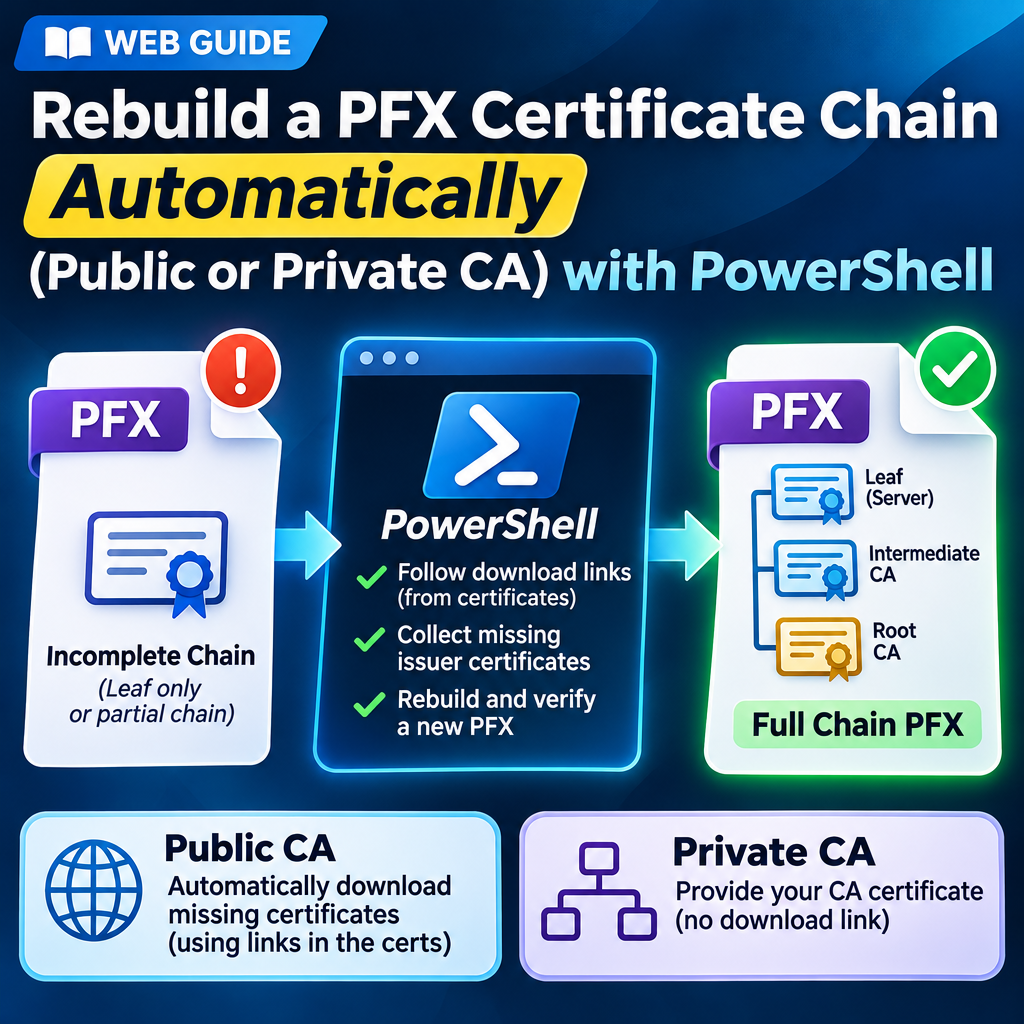
A PFX that holds only the leaf certificate, or the leaf and part of its chain, causes “certificate not trusted” errors and rejected uploads. Windows and browsers hide the problem by downloading the missing certificates themselves, so it only breaks on clients that do not. Repair-PfxChain.ps1 finds the missing certificates, writes a new PFX with the full chain, and checks it before keeping it.
Note: The original PFX is never changed, and the private key is never written to disk unencrypted.
In this article
Quick start
- Copy the script at the bottom into a file named
Repair-PfxChain.ps1. - Check that OpenSSL is available. Windows does not include it. The script finds the copy that comes with Git for Windows, or any
opensslon your PATH:
If that fails, install Git for Windows (openssl versionwinget install Git.Git), or install OpenSSL 1.1 or newer and add-OpenSsl "C:\path\to\openssl.exe"to the commands below. - Preview. This reads the PFX and follows the links but writes nothing:
.\Repair-PfxChain.ps1 -Pfx "C:\path\cert.pfx" -DryRun - Repair. The script asks for the PFX password.
-Hostnamealso checks that the leaf is valid for your site name:
It writes.\Repair-PfxChain.ps1 -Pfx "C:\path\cert.pfx" -Hostname app.example.comcert-fullchain.pfxnext to the original, but only if every integrity check passes. - Read the last line:
RESULT: DONEmeans the new file has the full chain. Check for a[NOTE]about trust (next item).DONE WITH WARNINGSmeans the chain is complete but a date or host name needs a look.- A
[NOTE]saying “Windows trusts this root but the public list does not” means the file is valid on Windows only. Go to the fix. NOT FOUND (the certificate has no download link)means you need to supply the CA certificate. Go to the fix for a private CA.- Anything else: what happens when something goes wrong.
- Do the after-repair steps, then upload the new PFX.
What you need
- Windows PowerShell 5.1 or PowerShell 7. The script works in both.
- OpenSSL 1.1 or newer. Windows does not include it. The copy that comes with Git for Windows (
C:\Program Files\Git\usr\bin\openssl.exe) is found automatically, as is anyopensslon your PATH. For any other location, add-OpenSsl "C:\path\to\openssl.exe"to the command. - The PFX and its password. A blank password works.
- Internet access to the CA’s download site, unless you use
-NoDownloadwith-IssuerFiles.
If PowerShell blocks the script because of the execution policy, run it like this instead:
powershell -ExecutionPolicy Bypass -File .\Repair-PfxChain.ps1 -Pfx "C:\path\cert.pfx"Fix: the chain ends at the wrong root
Important: RESULT: DONE does not guarantee that every client trusts the new file. Read the [NOTE] lines before you upload it.
Some CAs have two certificates with the same name: one self-signed, and one cross-signed by an older root. The script’s download links can lead to the self-signed one. Windows trusts it, but OpenSSL, curl, Java and Linux may not. You will see this note, even though the result says DONE:
[NOTE] Windows trusts this root but the public list does not. Clients that use the public list need the cross-signed path instead.The fix is to give the script the CA’s own bundle, which holds the cross-signed path, and to pin the root you expect. This is the command for a GoDaddy domain-validated certificate. The bundle is from GoDaddy’s repository, and the thumbprint is that of Go Daddy Root Certificate Authority - G2:
Invoke-WebRequest "https://certs.godaddy.com/repository/gd_bundle_dv-r1-g2.crt.pem" -OutFile gd-bundle.pem
.\Repair-PfxChain.ps1 -Pfx "C:\path\cert.pfx" -IssuerFiles .\gd-bundle.pem -ExpectedRootThumbprint 47BEABC922EAE80E78783462A79F45C254FDE68B- OV and EV certificates use
gd_bundle_ov-r1-g2.crt.pemandgd_bundle_ev-r1-g2.crt.pem. - For another CA, look on its certificate repository page for a bundle or a cross-signed certificate, and pass it with
-IssuerFiles. - To check the result, run the validator from the companion post on the new file. You want public trust PASS and no certificate supplied by Windows.
- Why this happens, and how the six GoDaddy test cases behaved: cross-signed roots explained.
Fix: private CA or no download link
A private CA usually has no download link in its certificates. Give the script the CA certificate you already have with -IssuerFiles. It accepts files or folders (.cer, .crt, .pem, .der, .p7b, .p7c), and -NoDownload keeps the run off the network:
.\Repair-PfxChain.ps1 -Pfx "C:\path\cert.pfx" -IssuerFiles "C:\path\ca.crt" -NoDownloadTo confirm that the root the script found is the one your CA published, pass the CA’s published thumbprint. The run fails and writes nothing if it does not match:
.\Repair-PfxChain.ps1 -Pfx "C:\path\cert.pfx" -ExpectedRootThumbprint "0E6F3E5D2B932405F5067D45DE6F0CB8EFE0927A"After the repair
- Check the new file with the validator from the companion post. You want public trust PASS and no certificate supplied by Windows.
-ExpectedRootThumbprintonly checks the root, so it cannot catch a missing intermediate. If the script printed “Windows trusts this root but the public list does not”, see the fix. - Upload or install the new
-fullchain.pfx. - Delete the temporary copies of keys and PFXs you no longer need.
Options
| Option | What it does |
|---|---|
-Pfx | The PFX to repair. Required. |
-Out | Where to write the new PFX. Default: <name>-fullchain.pfx next to the original. Relative paths are resolved from where you are in PowerShell. |
-Password, -OutPassword | SecureStrings. If -Password is omitted you are prompted. The new PFX reuses the input password unless you give -OutPassword. |
-Hostname | Also checks that the leaf is valid for this name. |
-IssuerFiles | Certificates you downloaded yourself, as files or folders. Anything in a folder that is not a certificate is ignored with a note. |
-NoDownload | Never use the network. The file, -IssuerFiles and the local trusted root lists are used. |
-ExpectedRootThumbprint | The SHA-1 or SHA-256 thumbprint of the root, as published by your CA. Colons and spaces are allowed. The run fails if the root found is different. |
-DryRun | Shows what would be added and writes nothing. |
-AllowPartial | Writes the new file even if the chain still does not reach a self-signed root. |
-Force | Allows overwriting an existing -Out file. |
-PublicRoots | A local copy of https://curl.se/ca/cacert.pem for offline use. |
-OpenSsl | Path to openssl.exe if it is not found automatically. |
Background and details
Everything below explains how the script works, shows example output, and lists what was tested and what is not covered. You do not need it to run the script.
Why the root and intermediates matter
A TLS chain runs from your certificate up to a self-signed root:
Leaf (your site) -> Intermediate CA -> Root CA (signs itself)Most TLS clients only need the leaf and the intermediates, because they already trust the root. App Service is stricter. Microsoft Learn (Install a TLS/SSL certificate for your app, “Private certificate requirements”) lists these requirements for a PFX you upload or import: it must be a password-protected PFX, and it must “contain all intermediate certificates and the root certificate in the certificate chain”. A leaf-only PFX, or one that stops at a cross-signed root, does not meet that.
If you only want to check a PFX rather than repair it, the companion post on validating a PFX chain covers that. This script is the repair step.
How it works
- Reads the PFX. It asks for the password and loads the certificates and the private key into memory only.
- Walks up the chain. For each certificate whose issuer is not yet found, it looks in this order: the PFX itself, any files you gave with
-IssuerFiles, certificates already downloaded earlier in the run, the certificate’s own “CA Issuers” download link (the AIA field), and finally the trusted root lists on this PC. It stops at a self-signed certificate. - Checks every download. Download links are normally plain
http://, so a certificate is only accepted if it really signed the certificate below it. A fake or tampered download fails that signature check and is ignored. - Writes a new PFX under a temporary name. The new file contains the original leaf and key, everything that was already in the file, and the certificates it added.
- Verifies the new file. If every integrity check passes, the file is renamed to its final name. If any check fails, no output file is left behind.
What it does and does not write
- The original PFX is never modified. Its SHA-256 is compared before and after, and
-Outcannot be the same file. - The private key stays in memory. It is never written to disk unencrypted, so there is no
key.pemto clean up. The only place it ends up is the new PFX, which is encrypted with your password. - The new PFX is staged. It is written under a temporary name next to
-Outand only renamed if every integrity check passes. A failed or interrupted run leaves no output file. - Temporary files are deleted when the script ends, even after an error. They are public certificates only. The one thing kept is a cached copy of the public Mozilla CA list in your temp folder (public data, reused for 7 days).
- Downloads are limited. Plain HTTP(S) GET requests, at most 1 MB, 20 seconds and 5 redirects each.
The checks it runs on the new file
| Check | Type |
|---|---|
| The leaf thumbprint is unchanged and the leaf still has its private key | Integrity (failure means nothing is written) |
| Every certificate that was in the original is still in the new file | Integrity |
| The private key matches the leaf, tested by signing and verifying (RSA and EC) | Integrity |
| The leaf chains to the self-signed root using only the file’s contents (OpenSSL, no Windows store) | Integrity |
| The chain ends at a self-signed root | Integrity |
The root matches -ExpectedRootThumbprint, if given | Integrity |
| The original PFX is unchanged | Integrity |
Validity dates of the leaf and the chain, and the host name if -Hostname was given | Warning (reported, the file is still written) |
| Whether the chain also validates against the Mozilla public list, and whether the root’s thumbprint is in that list or in this PC’s Windows root stores | Information |
| The password encryption used by the new PFX (TripleDES or AES), and a note if there is no password | Information |
Example: a private CA, issuer supplied
This is a leaf-only PFX from a home-lab CA. The CA certificate is passed with -IssuerFiles. Output is trimmed, and the file path is replaced:
Reading the PFX:
  Leaf: throwaway  [CFA8EE5185D777776F319A0809CFED5A42CE4084]
  The file contains 1 certificate(s) in total.

Following the issuer links:
  1. 'throwaway' is issued by 'icefire555 Home Lab CA' - from -IssuerFiles

Verifying the new file (2 certificate(s): the original 1 plus 1 added):
  [PASS] Leaf thumbprint is unchanged and it still has its private key: CFA8EE5185D777776F319A0809CFED5A42CE4084
  [PASS] All 1 original certificate(s) are still in the file.
  [PASS] Added: icefire555 Home Lab CA  [0E6F3E5D2B932405F5067D45DE6F0CB8EFE0927A]
  [PASS] The private key matches the leaf certificate.
  [PASS] The leaf chains to the self-signed root in the file ('icefire555 Home Lab CA'), using only the file's contents.
  [NOTE] The leaf does not chain to the public CA list (error 19 at 1 depth lookup: self-signed certificate in certificate chain). Expected for a private/internal CA.
  Top certificate: icefire555 Home Lab CA  [0E6F3E5D2B932405F5067D45DE6F0CB8EFE0927A]
  [NOTE] The top certificate's thumbprint is in neither the public list nor this PC's Windows root stores. Compare it with the value your CA publishes (or re-run with -ExpectedRootThumbprint). Normal for a private CA.
  [PASS] The leaf is valid: 2026-11-11 to 2027-11-11 (364 days left).
  [PASS] The original PFX is unchanged.
  [PASS] PFX encryption: TripleDES-SHA1.
  [NOTE] The new PFX has no password. App Service requires a password-protected PFX (use -OutPassword to set one).

Wrote the new PFX: C:\path\throwaway-fullchain.pfx
RESULT: DONE. The new PFX has the full chain, the same leaf and key, and the end certificate is valid.
Temporary files removed.
The two [NOTE] lines about trust are expected for a private CA. Nothing public or Windows-wide trusts it, which is why -ExpectedRootThumbprint matters here: it is how you confirm you added the right root.
Example: no download link and no help
The same file without -IssuerFiles. The leaf has no link to follow, so the script stops, writes nothing, and says what to do next:
Following the issuer links:
  1. 'throwaway' is issued by 'icefire555 Home Lab CA' - NOT FOUND (the certificate has no download link)

Nothing was written. To continue: download the missing issuer certificate from your CA (save it as .cer, .crt or .pem) and re-run with -IssuerFiles <that file or its folder>.
Temporary files removed.
Cross-signed roots explained
The script can print RESULT: DONE and still produce a file that only Windows trusts. This happens with a CA that has two certificates with the same name: one self-signed, and one cross-signed by an older root. I found it with GoDaddy, using a real GoDaddy PFX that I split into partial forms.
GoDaddy’s chain has four certificates. The PFX that came from GoDaddy holds all of them:
Leaf (app.example.com)
  -> GoDaddy TLS Intermediate CA DV - R1v1
    -> GoDaddy TLS Root CA - R1   (cross-signed, issued by Go Daddy Root Certificate Authority - G2)
      -> Go Daddy Root Certificate Authority - G2   (self-signed, in the Mozilla list)
The intermediate’s download link points to a self-signed copy of GoDaddy TLS Root CA - R1. Windows trusts that copy, but the Mozilla list does not, so OpenSSL, curl, Java and Linux reject the chain. The cross-signed copy is the one that reaches Go Daddy Root Certificate Authority - G2. Nothing in the certificates links to the cross-signed copy, so the script cannot discover it on its own. It stops at the first self-signed root it finds and prints this note:
[NOTE] Windows trusts this root but the public list does not. Clients that use the public list need the cross-signed path instead.This is how six partial forms of the same PFX behaved. Each was repaired with no extra options, then checked with the validator from the companion post:
| What the PFX held | Script, no extra options | Result |
|---|---|---|
| Full chain (all 4) | “Nothing to add”, no file written | Already good |
| Leaf only | Added the intermediate and the self-signed R1 | Windows only, not publicly trusted |
| Leaf + G2 root | Added the intermediate and the self-signed R1 | Windows only, not publicly trusted |
| Leaf + intermediate | Added the self-signed R1 | Windows only, not publicly trusted |
| Leaf + intermediate + cross-signed R1 | Added the G2 root | Good |
| Leaf + cross-signed R1 + G2 root (no intermediate) | Added the intermediate | Good |
A root alone is not enough. A file with the leaf and the roots but no intermediate fails public trust, because the intermediate is the certificate that signed the leaf.
The fix
The commands are in the fix near the top. In short, pass the CA’s bundle with -IssuerFiles. The script uses certificates from -IssuerFiles before it follows download links, so the cross-signed copy is picked up. Passing only the single cross-signed file, gd_tls_root-r1-cross-g2.crt.pem, works too, and -ExpectedRootThumbprint makes the run fail instead of writing a file that ends at the wrong root.
I ran this on the leaf-only, leaf + G2 root, and leaf + intermediate forms, with both the bundle and the single file. All six runs produced leaf, intermediate, cross-signed R1 and G2 root, and the validator reported public trust PASS and nothing supplied by Windows.
Other CAs. This is not unique to GoDaddy, but most CAs I tested did not need a fix. For GlobalSign, DigiCert, Google, Amazon, SSL.com and Let’s Encrypt, the download links led straight to a root that the public list trusts (see the test results). For any CA, run the validator on the new file. If it says Windows supplied a certificate or public trust fails, look on the CA’s repository page for a bundle or a cross-signed certificate and pass it with -IssuerFiles.
What happens when something goes wrong
Each of these cases was tested. In every case where the chain cannot be completed, no output file is written.
| Situation | Behavior |
|---|---|
| The download link returns a web page (a proxy, firewall or login page) | Reported as “a web page was returned instead of a certificate”, then the next link or fallback is tried. |
| The response is larger than 1 MB, is a 404, or is not a certificate | Rejected with the reason, then the next link or fallback is tried. |
| The first download link is dead and a second one works | The working link is used. |
| A redirect, or a redirect loop | Redirects are followed up to 5 times. A loop is reported and given up on. |
| The server never answers | Gives up after 20 seconds. |
| A downloaded certificate has the right name but did not sign the one below it | Rejected, because the signature check fails. This is what stops a tampered download. |
| The certificate has no download link | Looks in the file, -IssuerFiles, and the local trusted root lists. If still nothing, stops and tells you to use -IssuerFiles. |
| The top certificate is a cross-signed root whose own issuer cannot be reached | If a self-signed root with the same key and name is in the trusted lists, the chain ends there instead. |
| A certificate with the root’s name but a new key (a re-keyed root) | Not treated as a root. The script checks the certificate’s own signature and keeps walking. |
| A chain longer than 10 certificates | Stops to avoid a loop. -AllowPartial writes what was found. |
| The PFX already has the full chain | Says “Nothing to add” and writes nothing. |
| The leaf is self-signed | Says there is no chain to build and writes nothing. |
| Wrong password | “The PFX password appears to be wrong.” This also works on non-English Windows. |
| The file is a certificate, not a PFX, or is not a PFX at all | A clear message for each. |
| The output file exists, is a folder, or is the input file | Refused. Use -Force only to overwrite an existing output file. |
| The output folder is missing or not writable | Reported before any work is done. |
| An expired certificate (leaf, intermediate, or one to be added) | A warning. The chain is still rebuilt, and the result says “done with warnings”. Treat that as a call to action: an expired certificate in the chain can make clients reject the connection. |
The chain reaches a root that is expired and no longer downloadable (for example Let’s Encrypt’s old DST Root CA X3) | Reports the issuer as NOT FOUND and writes nothing. |
| The file has duplicate, out-of-order or stale certificates, but the chain is complete | “Nothing to add” and the file is left alone. The script does not remove stale or duplicate certificates, so an old expired intermediate stays in the file. Remove it yourself if it matters. |
| The file has no private key (for example a certificate-only PFX) | Refused with “contains no private key”. Nothing is written. |
| Several certificates in the file have a private key, or unrelated extra certificates | The chain of the end-entity certificate is repaired. The others are copied unchanged. |
Test results
I tested the script against a private CA hierarchy I built, a local web server standing in for a CA’s download site, real public chains, and a real local CA certificate.
- 62 automated cases in both Windows PowerShell 5.1 and PowerShell 7, all passing. They cover each row of the table above, and also EC keys, blank and special-character passwords, a preserved friendly name, relative and absolute
-Outpaths, paths and temp folders with spaces, brackets and accented characters, and every certificate download format: DER, PEM, a PEM bundle, DER and PEM PKCS#7, and bare base64. After each case the output was also opened with OpenSSL to confirm the certificate count and that the key matches the leaf, and I checked that no temporary files were left. - 26 real certificate chains. I took the leaf certificate from 24 public sites across about 15 CAs, plus two real PFX leaves, and walked each chain with the script’s own functions. All 26 reached a self-signed root. Most followed the download links. Three used the trusted-root fallback because an intermediate had no link, and one (Amazon) needed the cross-signed-root rescue. The script’s link parser matched OpenSSL’s reading on every certificate.
- A real local CA. A leaf-only copy of a home-lab CA PFX was repaired four ways, using the whole bundle folder (including files that hold the private key), the CA certificate alone, a full-chain PEM, and the CA certificate with
-ExpectedRootThumbprint. All four produced the same two certificates as the original, and the key still matched the leaf. - A real GoDaddy PFX, six partial forms. I split a real public-CA PFX (leaf, intermediate, cross-signed root and self-signed G2 root) into six forms and repaired each. Two forms (leaf + intermediate + cross-signed R1, and leaf + cross-signed R1 + G2) came out publicly trusted with no extra help. Three forms (leaf only, leaf + G2 root, leaf + intermediate) came out valid on Windows only, and became publicly trusted once I passed GoDaddy’s bundle or the cross-signed certificate with
-IssuerFiles. The full chain was left alone. See the cross-signed roots section. The new files were checked with the validator and by reading them back: the private key was present and the certificates were as expected. - Nine public test-site chains, walked without a key. I took the leaf certificate from CA test sites (Let’s Encrypt, GlobalSign R46, DigiCert Global G2, Google Trust Services, Amazon Trust Services and SSL.com, including expired examples) and ran the script’s own chain walk in
-DryRunmode on a test copy that accepts a certificate-only PFX. Eight reached a self-signed root, matching what each site serves. Amazon used the cross-signed-root rescue, and the expired SSL.com site’s issuer came from the trusted-root fallback. The ninth, Let’s Encrypt’s old expired host, stopped at the expiredDST Root CA X3with “NOT FOUND” and wrote nothing. This checks the walk, not the key handling or the file writing. - Synthetic edge cases. On a private test CA: a leaf-only PFX with the password
p@ss w0rd!éand AES encryption, an EC (P-256) leaf-only PFX with a blank password, an expired leaf, and a leaf under an expired intermediate. All were repaired, and the expired ones ended with warnings. A complete chain gave “Nothing to add”. A chain with a duplicate intermediate, a stale expired intermediate and the certificates out of order was also left alone, with the stale and duplicate certificates still in the file. - A public test PFX with no download link. The badssl.com client certificate (a leaf-only PFX from a private CA) stopped with “NOT FOUND (the certificate has no download link)”, wrote nothing, and told me to use
-IssuerFiles.
Limitations
- Only one real CA was rebuilt end to end. The full rebuild needs a private key, which CAs never publish. It was run on a real GoDaddy PFX and on private CAs. For other public CAs, the chain walk was tested on real certificates but the PFX writing was not. I have not uploaded any output to Azure App Service, so whether App Service accepts it is not tested.
- Which root it stops at. It stops at the first self-signed root the links lead to, and it cannot discover a cross-signed alternative by itself. For GoDaddy that is a self-signed R1 that Windows trusts but the Mozilla list does not. The fix is to pass the CA’s bundle with
-IssuerFilesand pin the root with-ExpectedRootThumbprint. See the cross-signed roots section. - Trusting a downloaded root. The signature check proves each certificate signed the one below it. It cannot prove the top of the chain is the root your CA publishes. Compare the thumbprint, or use
-ExpectedRootThumbprint. - Download links are followed as written. A certificate can point at any web address. The download limits apply, but if a certificate names an internal address, the script will try it. Use
-NoDownloadto avoid this. - Not tested: a proxy that asks for sign-in, HTTPS or LDAP download links (HTTPS is followed, LDAP is skipped), pressing Ctrl+C mid-run (cleanup is built to handle it, but I did not test it), antivirus locking files, paths over 260 characters, a badly wrong system clock, and OpenSSL older than 3.5 (older than 1.1 is rejected).
- No password on the output unless the input had one or you pass
-OutPassword. The script notes this. - The output is always TripleDES-SHA1 encrypted, even when the input used AES. I have not tested whether an input encrypted with older RC2 works, because I could not create one with my OpenSSL.
- It does not clean up the file. Stale, expired or duplicate certificates already in the PFX stay there. If the result says
Nothing to add, the file has a complete chain, but it may still carry an old certificate.
The full script
Copy everything below into a file named Repair-PfxChain.ps1. The comments at the top explain each option, and the code is commented section by section.
# Repair-PfxChain.ps1
# Usage: .\Repair-PfxChain.ps1 -Pfx "C:\path\cert.pfx" [-Out "C:\path\cert-fullchain.pfx"] [-Hostname app.example.com]
#        (prompts for the PFX password; press Enter if none)
#
# PURPOSE
#   Rebuilds a PFX so it contains the full certificate chain. For every certificate whose issuer is missing, it follows the
#   certificate's "Authority Information Access" (AIA) download link, fetches the issuing CA certificate and repeats until it
#   reaches a self-signed root. It writes a NEW .pfx containing the original leaf + private key + every certificate that was
#   already in the file + the certificates it added, then re-opens the new file and checks it.
#
# SAFETY
#   - The original PFX is never modified (its SHA-256 is compared before and after).
#   - The private key is kept in memory only. It is never written to disk unencrypted, so there is no key.pem to clean up.
#   - The new PFX is first written to a temporary name next to -Out and is only renamed to -Out if every integrity check
#     passes. A failed or interrupted run leaves no output file behind.
#   - The only other files are a temp folder of PUBLIC certificates (deleted at the end, even after an error) and a cached copy
#     of the public Mozilla CA list in %TEMP% (kept; it is public data).
#   - Downloads are plain HTTP(S) GET requests, limited to 1 MB, 20 seconds and 5 redirects. Because AIA links are usually
#     http://, a downloaded certificate is only accepted if it really signed the certificate below it (signature check).
#
# INTEGRITY CHECKS (a failure here means nothing is written)
#   leaf thumbprint unchanged | every original certificate still present | private key matches the leaf |
#   leaf chains to the self-signed root using only the file's contents | the chain ends at a self-signed root |
#   the top certificate matches -ExpectedRootThumbprint (if given)
# INFORMATION CHECKS (reported, but they do not block writing)
#   leaf and chain validity dates | host name (-Hostname) | Mozilla list / Windows root stores | PFX encryption type
#
# OPTIONS
#   -Out <file>                   where to write the new PFX (default: <name>-fullchain.pfx next to the original)
#   -Password / -OutPassword      SecureStrings; omit -Password to be prompted. The output reuses the input password unless -OutPassword is given.
#   -Hostname <name>              also check the leaf is valid for this name
#   -IssuerFiles <file|folder>... use certificates you downloaded yourself (.cer .crt .pem .der .p7b .p7c) - for networks that block the CA site
#   -NoDownload                   never use the network (use the file, -IssuerFiles and the local trusted-root lists only)
#   -ExpectedRootThumbprint <hex> the SHA-1 or SHA-256 thumbprint your CA publishes for its root; the run fails if the root found differs
#   -DryRun                       show what would be added, write nothing
#   -AllowPartial                 write the new file even if the chain still does not reach a self-signed root
#   -Force                        allow overwriting an existing -Out file
#   -PublicRoots <cacert.pem>     local copy of https://curl.se/ca/cacert.pem (offline use)   -OpenSsl <openssl.exe>
#
# Works in Windows PowerShell 5.1 and PowerShell 7. Needs OpenSSL 1.1 or newer (Git for Windows includes one).
# If scripts are blocked on this PC, run:  powershell -ExecutionPolicy Bypass -File .\Repair-PfxChain.ps1 -Pfx ...
param(
    [Parameter(Mandatory)][string]$Pfx,
    [string]$Out,
    [securestring]$Password,
    [securestring]$OutPassword,
    [string]$Hostname,
    [string[]]$IssuerFiles,
    [string]$ExpectedRootThumbprint,
    [string]$PublicRoots,
    [string]$OpenSsl,
    [switch]$NoDownload,
    [switch]$DryRun,
    [switch]$AllowPartial,
    [switch]$Force
)

$ErrorActionPreference = 'Stop'
try { [Net.ServicePointManager]::SecurityProtocol = [Net.ServicePointManager]::SecurityProtocol -bor [Net.SecurityProtocolType]::Tls12 } catch { }   # Windows PowerShell 5.1 needs TLS 1.2 enabled for HTTPS
$X509 = [Security.Cryptography.X509Certificates.X509Certificate2]
$Coll = [Security.Cryptography.X509Certificates.X509Certificate2Collection]
$MaxDepth = 10                      # a real chain is 3-5 certificates; this stops loops and runaway chains
$MaxDownloadBytes = 1MB             # an issuer certificate or bundle is a few KB
$script:problems = 0                # blocking failures
$script:warnings = 0                # reported but not blocking
$script:mozCerts = $null; $script:winRoots = $null
$tmp = Join-Path $env:TEMP "pfxrepair-$PID"     # temporary folder: PUBLIC certificates only
$partial = $null                                # temporary name of the new PFX until it passes verification
$selfCache = @{}
$imported = @()

function Ok($m)   { Write-Host "  [PASS] $m" -ForegroundColor Green }
function Bad($m)  { Write-Host "  [FAIL] $m" -ForegroundColor Red; $script:problems++ }
function Warn($m) { Write-Host "  [WARN] $m" -ForegroundColor Red; $script:warnings++ }
function Note($m) { Write-Host "  [NOTE] $m" -ForegroundColor Yellow }
function CN($dn)  { if ($dn -match '(?:^|,\s*)CN=([^,]+)') { $Matches[1].Trim() } else { $dn } }
function NameEq($a, $b) { ([string]$a).Trim() -ieq ([string]$b).Trim() }     # X.509 names compare case-insensitively

# ---------- Certificate <-> PEM (PEM is the base64 text form of a public certificate) ----------
function ToPem($c) { "-----BEGIN CERTIFICATE-----`n" + [Convert]::ToBase64String($c.RawData, 'InsertLineBreaks') + "`n-----END CERTIFICATE-----`n" }
function FromPem($p) { $X509::new([Convert]::FromBase64String(($p -replace '-----(BEGIN|END) CERTIFICATE-----', '' -replace '\s', ''))) }
function WritePem($c, $file) { Set-Content -LiteralPath $file -Value (ToPem $c) -Encoding ascii }

# ---------- OpenSSL (run without letting Windows PowerShell 5.1 turn its stderr into errors) ----------
function Ssl([string[]]$a) {
    $prev = $ErrorActionPreference; $ErrorActionPreference = 'Continue'
    try { $o = & $OpenSsl @a 2>&1 | ForEach-Object { $_.ToString() }; [pscustomobject]@{ Ok = ($LASTEXITCODE -eq 0); Text = ($o -join "`n") } }
    finally { $ErrorActionPreference = $prev }
}
function Reason($text) { $l = @($text -split "`n" | Where-Object { $_ -match '^error \d+ at' }); if ($l.Count) { $l[0] } else { 'verification failed' } }

# Did $issuer's key sign $child? Used to accept a downloaded certificate only if it is the real issuer (HTTP links can be tampered with).
function SignedBy($child, $issuer) {
    WritePem $child "$tmp\child.pem"; WritePem $issuer "$tmp\issuer.pem"
    (Ssl @('verify', '-partial_chain', '-no_check_time', '-CAfile', "$tmp\issuer.pem", "$tmp\child.pem")).Ok
}
# A real root signs itself. A certificate that only has subject == issuer by NAME but was signed by a different (older) key is a re-key
# certificate, not a root, and the walk must continue past it.
function IsSelfSigned($c) {
    if ($selfCache.ContainsKey($c.Thumbprint)) { return $selfCache[$c.Thumbprint] }
    $r = $false
    if (NameEq $c.Subject $c.Issuer) {
        # -check_ss_sig makes OpenSSL really verify the certificate's own signature (by default it skips that for a trust anchor)
        WritePem $c "$tmp\self.pem"
        $r = (Ssl @('verify', '-check_ss_sig', '-no_check_time', '-CAfile', "$tmp\self.pem", "$tmp\self.pem")).Ok
    }
    $selfCache[$c.Thumbprint] = $r; $r
}

# ---------- Reading certificate extensions straight from the raw bytes (independent of Windows language settings) ----------
function ExtRaw($c, $oid) { $e = $c.Extensions | Where-Object { $_.Oid.Value -eq $oid } | Select-Object -First 1; if ($e) { $e.RawData } }
function IsCA($c) { $e = $c.Extensions | Where-Object { $_.Oid.Value -eq '2.5.29.19' } | Select-Object -First 1; [bool]($e -and $e.CertificateAuthority) }
function Ski($c) { $b = ExtRaw $c '2.5.29.14'; if ($b -and $b.Length -gt 2 -and $b[0] -eq 0x04) { [BitConverter]::ToString($b, 2, $b[1]) } }          # Subject Key Identifier
function Aki($c) {                                                                                                                               # Authority Key Identifier: SEQUENCE { [0] keyIdentifier }
    $b = ExtRaw $c '2.5.29.35'; if (-not $b -or $b.Length -lt 4 -or $b[0] -ne 0x30) { return }
    $i = 2; if ($b[1] -ge 0x80) { $i = 2 + ($b[1] -band 0x7F) }
    if ($i + 1 -lt $b.Length -and $b[$i] -eq 0x80) { [BitConverter]::ToString($b, $i + 2, $b[$i + 1]) }
}
function KeyIdMatch($child, $cand) { $a = Aki $child; $s = Ski $cand; [bool]($a -and $s -and $a -eq $s) }
# "CA Issuers" download links (AIA, accessMethod 1.3.6.1.5.5.7.48.2) followed by a [6] URI string.
function AiaUrls($c) {
    $b = ExtRaw $c '1.3.6.1.5.5.7.1.1'; if (-not $b) { return @() }
    $pat = [byte[]](0x06, 0x08, 0x2B, 0x06, 0x01, 0x05, 0x05, 0x07, 0x30, 0x02); $urls = @()
    for ($i = 0; $i -le $b.Length - $pat.Length - 3; $i++) {
        $hit = $true; for ($k = 0; $k -lt $pat.Length; $k++) { if ($b[$i + $k] -ne $pat[$k]) { $hit = $false; break } }
        if (-not $hit) { continue }
        $p = $i + $pat.Length; if ($b[$p] -ne 0x86) { continue }
        $len = $b[$p + 1]; $off = $p + 2
        if ($len -ge 0x80) { $n = $len -band 0x7F; $len = 0; for ($k = 0; $k -lt $n; $k++) { $len = ($len -shl 8) + $b[$p + 2 + $k] }; $off = $p + 2 + $n }
        if ($off + $len -le $b.Length) { $urls += [Text.Encoding]::ASCII.GetString($b, $off, $len) }
    }
    $urls
}

# ---------- Downloading ----------
# HTTP(S) GET with a time limit, a size limit, a redirect limit, and the system proxy using the signed-in user's credentials.
function Fetch($url, $max) {
    $req = [Net.HttpWebRequest]::Create($url)
    $req.Method = 'GET'; $req.Timeout = 20000; $req.ReadWriteTimeout = 20000; $req.AllowAutoRedirect = $true; $req.MaximumAutomaticRedirections = 5
    $req.UserAgent = 'Repair-PfxChain'
    try { $req.Proxy = [Net.WebRequest]::GetSystemWebProxy(); $req.Proxy.Credentials = [Net.CredentialCache]::DefaultCredentials } catch { }
    $resp = $req.GetResponse()
    try {
        if ($resp.ResponseUri.Scheme -notin 'http', 'https') { throw "redirected to a non-HTTP address" }
        $s = $resp.GetResponseStream(); $ms = New-Object IO.MemoryStream; $buf = New-Object byte[] 8192
        while (($n = $s.Read($buf, 0, $buf.Length)) -gt 0) { $ms.Write($buf, 0, $n); if ($ms.Length -gt $max) { throw "the response is larger than $([int]($max / 1KB)) KB, which is not a certificate" } }
        , $ms.ToArray()
    } finally { $resp.Close() }
}
# Turn downloaded/read bytes into certificates. Accepts: one DER certificate, PEM text (one or many), a PKCS#7 bundle (.p7b/.p7c, DER or PEM),
# and bare base64. A web page (proxy block page, login page, error page) is recognised and reported as such.
function ParseCerts([byte[]]$b) {
    $txt = [Text.Encoding]::ASCII.GetString($b)
    if ($txt -match '(?i)<\s*(html|!doctype|head|body)') { throw 'a web page was returned instead of a certificate (a proxy, firewall or login page may be blocking the download)' }
    $list = @()
    try {
        if ($txt -match '-----BEGIN CERTIFICATE-----') {
            foreach ($m in [regex]::Matches($txt, '-----BEGIN CERTIFICATE-----.*?-----END CERTIFICATE-----', 'Singleline')) { $list += FromPem $m.Value }
        } elseif ($txt -match '-----BEGIN (PKCS7|CMS)-----(.*?)-----END (PKCS7|CMS)-----') {
            $col = $Coll::new(); $col.Import([Convert]::FromBase64String(($Matches[2] -replace '\s', ''))); $list += @($col | ForEach-Object { $_ })
        } else {
            $col = $Coll::new()
            try { $col.Import($b) } catch { $col.Import([Convert]::FromBase64String(($txt -replace '\s', ''))) }     # DER, else bare base64
            $list += @($col | ForEach-Object { $_ })
        }
    } catch { throw 'the response is not in a recognised certificate format' }
    if (-not $list.Count) { throw 'no certificates were found in the response' }
    $list
}
function LoadIssuerFiles($paths) {
    $found = @()
    foreach ($p in $paths) {
        if (-not (Test-Path -LiteralPath $p)) { throw "-IssuerFiles path not found: $p" }
        $files = if ((Get-Item -LiteralPath $p).PSIsContainer) { @(Get-ChildItem -LiteralPath $p -File | Where-Object { $_.Extension -match '^\.(cer|crt|pem|der|p7b|p7c)$' }) } else { @(Get-Item -LiteralPath $p) }
        foreach ($f in $files) { try { $found += ParseCerts ([IO.File]::ReadAllBytes($f.FullName)) } catch { Note "Ignoring $($f.Name): $($_.Exception.Message)" } }
    }
    $found
}

# ---------- Trusted root lists (only used to find a missing ROOT and to report trust; never as a source of intermediates) ----------
function GetMozilla {
    if ($null -ne $script:mozCerts) { return $script:mozCerts }
    $script:mozCerts = @(); $file = $PublicRoots
    if ($file -and -not (Test-Path -LiteralPath $file)) { Note "-PublicRoots file not found: $file"; return $script:mozCerts }
    if (-not $file) {
        $file = Join-Path $env:TEMP 'mozilla-cacert.pem'
        $stale = (-not (Test-Path -LiteralPath $file)) -or (((Get-Date) - (Get-Item -LiteralPath $file).LastWriteTime).TotalDays -gt 7)
        if ($stale -and -not $NoDownload) { try { [IO.File]::WriteAllBytes($file, (Fetch 'https://curl.se/ca/cacert.pem' 5MB)) } catch { Note "Could not download the Mozilla public CA list ($($_.Exception.Message))." } }
        if (-not (Test-Path -LiteralPath $file)) { return $script:mozCerts }
    }
    $script:mozCerts = @([regex]::Matches((Get-Content -LiteralPath $file -Raw), '-----BEGIN CERTIFICATE-----.*?-----END CERTIFICATE-----', 'Singleline') | ForEach-Object { FromPem $_.Value })
    $script:mozCerts
}
function GetWinRoots {
    if ($null -ne $script:winRoots) { return $script:winRoots }
    $script:winRoots = @(foreach ($s in 'Cert:\CurrentUser\Root', 'Cert:\LocalMachine\Root', 'Cert:\LocalMachine\AuthRoot', 'Cert:\CurrentUser\AuthRoot') { if (Test-Path $s) { Get-ChildItem $s | ForEach-Object { $X509::new($_.RawData) } } })
    $script:winRoots
}

# ---------- Key and encryption checks ----------
# $true = key matches the certificate, $false = it does not, $null = this key type cannot be tested here.
function KeyMatches($cert) {
    try {
        $data = [Text.Encoding]::UTF8.GetBytes('pfx-key-check'); $sha = [Security.Cryptography.HashAlgorithmName]::SHA256
        $rsa = [Security.Cryptography.X509Certificates.RSACertificateExtensions]::GetRSAPrivateKey($cert)
        if ($rsa) { $sig = $rsa.SignData($data, $sha, [Security.Cryptography.RSASignaturePadding]::Pkcs1); return [Security.Cryptography.X509Certificates.RSACertificateExtensions]::GetRSAPublicKey($cert).VerifyData($data, $sig, $sha, [Security.Cryptography.RSASignaturePadding]::Pkcs1) }
        $ec = [Security.Cryptography.X509Certificates.ECDsaCertificateExtensions]::GetECDsaPrivateKey($cert)
        if ($ec) { $sig = $ec.SignData($data, $sha); return [Security.Cryptography.X509Certificates.ECDsaCertificateExtensions]::GetECDsaPublicKey($cert).VerifyData($data, $sig, $sha) }
        $null
    } catch { $false }
}
function PbeAlgorithms($bytes) {      # algorithm identifiers are stored in the clear inside a PFX
    $hex = [BitConverter]::ToString($bytes) -replace '-', ''
    $known = [ordered]@{ '060A2A864886F70D010C0103' = 'TripleDES-SHA1'; '060A2A864886F70D010C0106' = 'RC2-40'; '06092A864886F70D01050D' = 'PBES2 (AES)' }
    foreach ($k in $known.Keys) { $i = $hex.IndexOf($k); while ($i -ge 0) { if ($i % 2 -eq 0) { $known[$k]; break }; $i = $hex.IndexOf($k, $i + 1) } }
}
function IsWrongPassword($err) {      # 0x80070056 is Windows' wrong-password code; the text is translated on non-English Windows, the code is not
    $e = $err.Exception
    while ($e) { if ($e.HResult -eq -2147024810 -or $e.Message -match '0x80070056|password') { return $true }; $e = $e.InnerException }
    $false
}

# ---------- Finding the issuer of a certificate: file, -IssuerFiles, earlier downloads, AIA download link, trusted root lists ----------
$script:why = ''
function Pick($child, $cands, $seen) {
    $m = @($cands | Where-Object { $_.Thumbprint -notin $seen -and ((NameEq $child.Issuer $_.Subject) -or (KeyIdMatch $child $_)) })   # name or key-id match first (cheap) ...
    $good = @($m | Where-Object { SignedBy $child $_ })                                                                               # ... then the signature decides
    [pscustomobject]@{ Matched = $m.Count; Good = $good }
}
function Best($good) { $s = @($good | Where-Object { IsSelfSigned $_ }); if ($s.Count) { $s[0] } else { $good[0] } }    # a bundle can hold cross-signed copies; prefer the self-signed root
function FindIssuer($child, $seen) {
    $script:why = ''
    foreach ($s in @(@{ N = 'already in the file'; C = $filePool; New = $false }, @{ N = 'from -IssuerFiles'; C = $filesPool; New = $true }, @{ N = 'downloaded earlier'; C = $dlPool; New = $true })) {
        $r = Pick $child @($s.C) $seen
        if ($r.Good.Count) { return @{ Cert = (Best $r.Good); Where = $s.N; New = $s.New } }
    }
    $urls = @(AiaUrls $child)
    if (-not $urls.Count) { $script:why = 'the certificate has no download link' }
    elseif ($NoDownload) { $script:why = '-NoDownload was used, so the download link was not followed' }
    else {
        foreach ($u in $urls) {
            if ($u -notmatch '^https?://') { Note "Skipping a link that is not HTTP/HTTPS: $u"; continue }
            try { $got = @(ParseCerts (Fetch $u $MaxDownloadBytes)) } catch { Note "Could not use $u ($($_.Exception.Message))"; continue }
            foreach ($g in $got) { if ($g.Thumbprint -notin @($dlPool | ForEach-Object { $_.Thumbprint })) { [void]$dlPool.Add($g) } }
            $r = Pick $child $got $seen
            if ($r.Good.Count) { return @{ Cert = (Best $r.Good); Where = "downloaded from $u"; New = $true } }
            if ($r.Matched) { Note "$u returned a certificate named '$(CN $child.Issuer)' but it did not sign '$(CN $child.Subject)' (the CA may have changed its keys; use the certificate your CA originally supplied)." }
            else { Note "$u did not contain '$(CN $child.Issuer)'." }
        }
        $script:why = 'no download link returned a certificate that signed it'
    }
    # last resort: the issuer is a trusted root we already have locally (no network needed)
    $r = Pick $child (@(GetMozilla) + @(GetWinRoots)) $seen
    if ($r.Good.Count) { return @{ Cert = (Best $r.Good); Where = 'found in the trusted root lists on this PC'; New = $true } }
    $null
}

# A cross-signed copy of a root (same name and key as a self-signed root, but issued by another CA) whose own issuer cannot be reached:
# the self-signed copy in the trusted root lists has the SAME KEY, so it signs the same certificates and can end the chain instead.
function FindTrustedTwin($c) {
    $k = [Convert]::ToBase64String($c.PublicKey.EncodedKeyValue.RawData)
    foreach ($t in (@(GetMozilla) + @(GetWinRoots))) {
        if ($t.Thumbprint -ne $c.Thumbprint -and (NameEq $t.Subject $c.Subject) -and ([Convert]::ToBase64String($t.PublicKey.EncodedKeyValue.RawData) -eq $k) -and (IsSelfSigned $t)) { return $t }
    }
}

# =====================================================================================================================
try {
    # ---------- Pre-flight: everything that can be checked before touching the PFX ----------
    if (-not $OpenSsl) { $OpenSsl = @('C:\Program Files\Git\usr\bin\openssl.exe', (Get-Command openssl -ErrorAction SilentlyContinue).Source) | Where-Object { $_ -and (Test-Path -LiteralPath $_) } | Select-Object -First 1 }
    if (-not $OpenSsl) { throw "OpenSSL not found. Install Git for Windows or pass -OpenSsl <path to openssl.exe>." }
    $ver = (Ssl @('version')).Text
    if ($ver -match 'OpenSSL (\d+)\.(\d+)' -and ([int]$Matches[1] -lt 1 -or ([int]$Matches[1] -eq 1 -and [int]$Matches[2] -lt 1))) { throw "This OpenSSL is too old ($ver). OpenSSL 1.1 or newer is required." }

    if (-not (Test-Path -LiteralPath $Pfx -PathType Leaf)) { throw "File not found: $Pfx" }
    $PfxFull = (Resolve-Path -LiteralPath $Pfx).Path
    if (-not $Out) { $Out = Join-Path (Split-Path $PfxFull) (([IO.Path]::GetFileNameWithoutExtension($PfxFull)) + '-fullchain.pfx') }
    $OutFull = $ExecutionContext.SessionState.Path.GetUnresolvedProviderPathFromPSPath($Out)     # relative to where YOU are in PowerShell, not the process folder
    if ($OutFull -ieq $PfxFull) { throw "-Out must be a different file from the original PFX. The original is never overwritten." }
    $outDir = Split-Path $OutFull
    if (-not (Test-Path -LiteralPath $outDir -PathType Container)) { throw "The folder for -Out does not exist: $outDir" }
    if (Test-Path -LiteralPath $OutFull -PathType Container) { throw "-Out is a folder, not a file: $OutFull" }
    if ((Test-Path -LiteralPath $OutFull) -and -not $Force -and -not $DryRun) { throw "Output file already exists: $OutFull. Use -Force to overwrite it, or pick another -Out." }
    if (-not $DryRun) {
        $probe = "$OutFull.probe-$PID"
        try { [IO.File]::WriteAllBytes($probe, [byte[]]@()); Remove-Item -LiteralPath $probe -Force } catch { throw "Cannot write to the output folder ($outDir): $($_.Exception.Message) Use -Out to choose another folder." }
    }
    if ($ExpectedRootThumbprint) {
        $expect = ($ExpectedRootThumbprint -replace '[^0-9A-Fa-f]', '').ToUpper()
        if ($expect.Length -ne 40 -and $expect.Length -ne 64) { throw "-ExpectedRootThumbprint must be a SHA-1 (40 hex digits) or SHA-256 (64 hex digits) thumbprint." }
    }
    $origHash = (Get-FileHash -LiteralPath $PfxFull -Algorithm SHA256).Hash
    New-Item -ItemType Directory -Path $tmp -Force | Out-Null
    $filesPool = @(); if ($IssuerFiles) { $filesPool = @(LoadIssuerFiles $IssuerFiles) }
    $dlPool = New-Object System.Collections.ArrayList

    # ---------- Read the PFX (the private key stays in memory) ----------
    if (-not $Password) { $Password = Read-Host "PFX password (Enter if none)" -AsSecureString }
    $bstr = [Runtime.InteropServices.Marshal]::SecureStringToBSTR($Password)
    try { $plain = [Runtime.InteropServices.Marshal]::PtrToStringBSTR($bstr) } finally { [Runtime.InteropServices.Marshal]::ZeroFreeBSTR($bstr) }
    $flags = [Security.Cryptography.X509Certificates.X509KeyStorageFlags]::Exportable           # Exportable so the key can be written to the new PFX
    if ([Enum]::GetNames([Security.Cryptography.X509Certificates.X509KeyStorageFlags]) -contains 'EphemeralKeySet') { $flags = $flags -bor [Security.Cryptography.X509Certificates.X509KeyStorageFlags]::EphemeralKeySet }   # keep the key out of the Windows key store

    $tries = @($plain); if ($plain -eq '') { $tries += [NullString]::Value }      # a blank password can be stored as "empty" or as "none"
    $col = $null; $pwIn = $null; $lastErr = $null
    foreach ($p in $tries) { try { $c = $Coll::new(); $c.Import($PfxFull, $p, $flags); $col = $c; $pwIn = $p; break } catch { $lastErr = $_; if (-not (IsWrongPassword $_)) { break } } }
    if (-not $col) {
        if (IsWrongPassword $lastErr) { throw "The PFX password appears to be wrong. Nothing was changed. Please re-run and try again." }
        throw "Could not read the PFX (is it a valid .pfx file?): $($lastErr.Exception.Message)"
    }
    $all = @($col | ForEach-Object { $_ }); $imported = $all
    $withKey = @($all | Where-Object { $_.HasPrivateKey })
    if (-not $withKey.Count) { throw "The file was read, but it contains no private key. Is it a .cer/.pem certificate file rather than a .pfx? A PFX with its private key is needed to rebuild it." }
    $leaf = $withKey | Where-Object { -not (IsCA $_) } | Select-Object -First 1; if (-not $leaf) { $leaf = $withKey[0] }
    $seenThumbs = @{}; $filePool = @($all | Where-Object { $_.Thumbprint -ne $leaf.Thumbprint -and -not $seenThumbs.ContainsKey($_.Thumbprint) -and ($seenThumbs[$_.Thumbprint] = $true) })   # de-duplicated
    $origThumbs = @($all | ForEach-Object { $_.Thumbprint })

    Write-Host "Reading the PFX:"
    Write-Host "  Leaf: $(CN $leaf.Subject)  [$($leaf.Thumbprint)]"
    Write-Host "  The file contains $($all.Count) certificate(s) in total."
    if ($withKey.Count -gt 1) { Note "$($withKey.Count) certificates in this file have a private key. Repairing the chain of '$(CN $leaf.Subject)'; the others are copied unchanged." }
    if (IsSelfSigned $leaf) { Write-Host "`nThe leaf certificate is self-signed (it was not issued by a CA), so there is no chain to build. Nothing was written." -ForegroundColor Yellow; return }

    # ---------- Follow the issuer links up to a self-signed root ----------
    Write-Host "`nFollowing the issuer links:"
    $chain = New-Object System.Collections.ArrayList; $added = New-Object System.Collections.ArrayList
    $current = $leaf; $complete = $false; $step = 0; $stopped = $null
    while ($true) {
        if (IsSelfSigned $current) { $complete = $true; break }
        if ($step -ge $MaxDepth) { $stopped = "The chain is longer than $MaxDepth certificates, which is not a normal chain. Stopping to avoid a loop."; Write-Host "  [STOP] $stopped" -ForegroundColor Red; break }
        $step++
        $seen = @($leaf.Thumbprint) + @($chain | ForEach-Object { $_.Thumbprint })
        $found = FindIssuer $current $seen
        if (-not $found -and $chain.Count -gt 0) {
            $twin = FindTrustedTwin $current
            $prevCert = if ($chain.Count -gt 1) { $chain[$chain.Count - 2] } else { $leaf }
            if ($twin -and (SignedBy $prevCert $twin)) { $found = @{ Cert = $twin; Where = "the issuer of the cross-signed '$(CN $current.Subject)' is unreachable, so it is replaced by the self-signed root with the same key from the trusted root lists"; New = $true; Replaces = $true } }
        }
        if (-not $found) { $stopped = "'$(CN $current.Issuer)' was not found ($script:why)."; Write-Host "  $step. '$(CN $current.Subject)' is issued by '$(CN $current.Issuer)' - NOT FOUND ($script:why)" -ForegroundColor Red; break }
        if ($found.Replaces) { $old = $chain[$chain.Count - 1]; $chain.RemoveAt($chain.Count - 1); [void]$added.Remove($old); Write-Host "  $step. $($found.Where)" }
        else { Write-Host "  $step. '$(CN $current.Subject)' is issued by '$(CN $found.Cert.Subject)' - $($found.Where)" }
        [void]$chain.Add($found.Cert); if ($found.New) { [void]$added.Add($found.Cert) }
        $current = $found.Cert
    }
    $top = $current

    if ($complete -and $ExpectedRootThumbprint) {
        $sha1 = $top.Thumbprint; $sha256 = [BitConverter]::ToString([Security.Cryptography.SHA256]::Create().ComputeHash($top.RawData)) -replace '-', ''
        if ($expect -ne $sha1 -and $expect -ne $sha256) { throw "The root certificate found ('$(CN $top.Subject)') has SHA-1 thumbprint $sha1, which does not match -ExpectedRootThumbprint. Nothing was written." }
        Ok "The root certificate matches -ExpectedRootThumbprint."
    }
    foreach ($c in $added) {
        $na = $c.NotAfter.ToUniversalTime(); $nb = $c.NotBefore.ToUniversalTime()
        if ([DateTime]::UtcNow -gt $na) { Warn "The certificate to be added '$(CN $c.Subject)' expired on $($na.ToString('yyyy-MM-dd')). Clients may reject a chain that contains it." }
        elseif ([DateTime]::UtcNow -lt $nb) { Warn "The certificate to be added '$(CN $c.Subject)' is not valid until $($nb.ToString('yyyy-MM-dd'))." }
    }

    if ($complete -and $added.Count -eq 0) { Write-Host "`nNothing to add: the file already contains the full chain up to the self-signed root '$(CN $top.Subject)'. No new file was written." -ForegroundColor Green; return }
    if (-not $complete -and $added.Count -eq 0) {
        Write-Host "`nNothing was written. To continue: download the missing issuer certificate from your CA (save it as .cer, .crt or .pem) and re-run with -IssuerFiles <that file or its folder>." -ForegroundColor Yellow
        return
    }
    if (-not $complete -and -not $AllowPartial) {
        Write-Host "`nThe chain still does not reach a self-signed root, so nothing was written. Download the missing issuer certificate from your CA and re-run with -IssuerFiles <file or folder>, or use -AllowPartial to write what was found." -ForegroundColor Yellow
        return
    }
    if ($DryRun) {
        Write-Host "`nDry run: nothing was written. These $($added.Count) certificate(s) would be added:" -ForegroundColor Cyan
        foreach ($a in $added) { Write-Host "  + $(CN $a.Subject)  [$($a.Thumbprint)]" }
        return
    }

    # ---------- Write the new PFX under a temporary name ----------
    $outCol = $Coll::new(); $have = @{}
    foreach ($c in (@($leaf) + $filePool + @($added))) { if (-not $have.ContainsKey($c.Thumbprint)) { $have[$c.Thumbprint] = $true; [void]$outCol.Add($c) } }
    if ($OutPassword) {
        $b2 = [Runtime.InteropServices.Marshal]::SecureStringToBSTR($OutPassword)
        try { $pwOut = [Runtime.InteropServices.Marshal]::PtrToStringBSTR($b2) } finally { [Runtime.InteropServices.Marshal]::ZeroFreeBSTR($b2) }
        if ($pwOut -eq '') { $pwOut = [NullString]::Value }
    } else { $pwOut = $pwIn }
    $bytes = $outCol.Export([Security.Cryptography.X509Certificates.X509ContentType]::Pfx, $pwOut)
    $partial = "$OutFull.partial-$PID"
    [IO.File]::WriteAllBytes($partial, $bytes)

    # ---------- Verify the NEW file (before it gets its final name) ----------
    Write-Host "`nVerifying the new file ($($outCol.Count) certificate(s): the original $($all.Count) plus $($added.Count) added):"
    $new = $Coll::new(); $new.Import($partial, $pwOut, $flags)
    $newAll = @($new | ForEach-Object { $_ }); $imported += $newAll
    $newLeaf = $newAll | Where-Object { $_.Thumbprint -eq $leaf.Thumbprint -and $_.HasPrivateKey } | Select-Object -First 1
    $newThumbs = @($newAll | ForEach-Object { $_.Thumbprint })

    if ($newLeaf) { Ok "Leaf thumbprint is unchanged and it still has its private key: $($leaf.Thumbprint)" } else { Bad "The leaf thumbprint changed or the private key is missing." }
    $lost = @($origThumbs | Where-Object { $_ -notin $newThumbs })
    if ($lost.Count -eq 0) { Ok "All $(@($origThumbs | Select-Object -Unique).Count) original certificate(s) are still in the file." } else { Bad "Original certificate(s) missing from the new file: $($lost -join ', ')" }
    foreach ($a in $added) { Ok "Added: $(CN $a.Subject)  [$($a.Thumbprint)]" }

    $km = if ($newLeaf) { KeyMatches $newLeaf } else { $false }
    if ($km -eq $true) { Ok "The private key matches the leaf certificate." }
    elseif ($null -eq $km) { Note "Could not test the private key match for this key type ($($leaf.PublicKey.Oid.FriendlyName))." }
    else { Bad "The private key does not match the leaf certificate." }

    # chain checks with OpenSSL (the Windows stores are not used); dates are reported separately below
    $others = @($newAll | Where-Object { $_.Thumbprint -ne $leaf.Thumbprint })
    WritePem $leaf "$tmp\leaf.pem"
    if ($others.Count) { Set-Content -LiteralPath "$tmp\others.pem" -Value (($others | ForEach-Object { ToPem $_ }) -join '') -Encoding ascii }
    $fileRoot = if ($complete) { $others | Where-Object { $_.Thumbprint -eq $top.Thumbprint } | Select-Object -First 1 }      # the root this chain ends at (the file may hold other, unrelated roots)
    if ($fileRoot) {
        WritePem $fileRoot "$tmp\fileroot.pem"
        $r = Ssl @('verify', '-no_check_time', '-CAfile', "$tmp\fileroot.pem", '-untrusted', "$tmp\others.pem", "$tmp\leaf.pem")
        if ($r.Ok) { Ok "The leaf chains to the self-signed root in the file ('$(CN $fileRoot.Subject)'), using only the file's contents." } else { Bad "The leaf does not chain to the root in the file: $(Reason $r.Text)" }
    } elseif ($complete) { Bad "The new file has no self-signed root." }
    else { Note "The chain does not reach a self-signed root (written because of -AllowPartial)." }

    $moz = @(GetMozilla); $inMozilla = $false
    if ($moz.Count) {
        $inMozilla = $top.Thumbprint -in @($moz | ForEach-Object { $_.Thumbprint })
        $mozFile = "$tmp\moz.pem"; Set-Content -LiteralPath $mozFile -Value (($moz | ForEach-Object { ToPem $_ }) -join '') -Encoding ascii
        $r = Ssl @('verify', '-no_check_time', '-CAfile', $mozFile, '-untrusted', "$tmp\others.pem", "$tmp\leaf.pem")
        if ($r.Ok) { Ok "The leaf also chains to the public CA list ($(if ($PublicRoots) { 'the list you supplied' } else { 'Mozilla' }))." }
        else { Note "The leaf does not chain to the public CA list ($(Reason $r.Text)). Expected for a private/internal CA." }
    } else { Note "The public CA list is unavailable (offline?). Pass -PublicRoots <cacert.pem> to check it." }

    $inWindows = $top.Thumbprint -in @(GetWinRoots | ForEach-Object { $_.Thumbprint })
    Write-Host "  Top certificate: $(CN $top.Subject)  [$($top.Thumbprint)]"
    if (-not (IsSelfSigned $top)) { if ($complete) { Bad "The chain does not end at a self-signed root." } }
    elseif ($inMozilla -or $inWindows) { Ok "The top certificate's thumbprint matches a trusted root (public list: $(if ($inMozilla) { 'yes' } else { 'no' }); this PC's Windows root stores: $(if ($inWindows) { 'yes' } else { 'no' }))." }
    elseif (-not $ExpectedRootThumbprint) { Note "The top certificate's thumbprint is in neither the public list nor this PC's Windows root stores. Compare it with the value your CA publishes (or re-run with -ExpectedRootThumbprint). Normal for a private CA." }
    if ((IsSelfSigned $top) -and $inWindows -and -not $inMozilla -and $moz.Count) { Note "Windows trusts this root but the public list does not. Clients that use the public list need the cross-signed path instead." }

    # validity dates of every certificate in the chain (reported, not blocking)
    $now = [DateTime]::UtcNow
    foreach ($c in (@($leaf) + @($chain))) {
        $nb = $c.NotBefore.ToUniversalTime(); $na = $c.NotAfter.ToUniversalTime(); $days = [int][math]::Floor(($na - $now).TotalDays); $isLeaf = ($c.Thumbprint -eq $leaf.Thumbprint)
        $what = if ($isLeaf) { 'The leaf' } else { "'$(CN $c.Subject)'" }
        if ($now -gt $na) { Warn "$what EXPIRED on $($na.ToString('yyyy-MM-dd'))." }
        elseif ($now -lt $nb) { Warn "$what is not valid until $($nb.ToString('yyyy-MM-dd')) (is this PC's clock correct?)." }
        elseif ($isLeaf -and $days -lt 30) { Note "The leaf is valid but expires in $days days ($($na.ToString('yyyy-MM-dd')))." }
        elseif ($isLeaf) { Ok "The leaf is valid: $($nb.ToString('yyyy-MM-dd')) to $($na.ToString('yyyy-MM-dd')) ($days days left)." }
    }
    if ($Hostname) {
        $r = Ssl @('verify', '-no_check_time', '-partial_chain', '-CAfile', "$tmp\leaf.pem", '-verify_hostname', $Hostname, "$tmp\leaf.pem")
        if ($r.Text -match 'hostname mismatch') { Warn "The leaf is not valid for '$Hostname'." } else { Ok "The leaf is valid for '$Hostname'." }
    }
    if ((Get-FileHash -LiteralPath $PfxFull -Algorithm SHA256).Hash -eq $origHash) { Ok "The original PFX is unchanged." } else { Bad "The original PFX changed." }
    $algs = @(PbeAlgorithms $bytes)
    if ($algs -contains 'PBES2 (AES)') { Note "The new PFX uses AES (PBES2) encryption. App Service documents TripleDES; if an upload is rejected, re-export with TripleDES." }
    elseif ($algs.Count) { Ok "PFX encryption: $($algs -join ', ')." }
    if (($pwOut -isnot [string]) -or $pwOut -eq '') { Note "The new PFX has no password. App Service requires a password-protected PFX (use -OutPassword to set one)." }

    # ---------- Only now give the file its real name ----------
    Write-Host ""
    if ($script:problems -gt 0) {
        Write-Host "RESULT: NOT WRITTEN. $($script:problems) integrity check(s) failed (see the [FAIL] lines above), so no output file was created." -ForegroundColor Red
    } else {
        Move-Item -LiteralPath $partial -Destination $OutFull -Force; $partial = $null
        Write-Host "Wrote the new PFX: $OutFull"
        if ($script:warnings -eq 0 -and $complete) { Write-Host "RESULT: DONE. The new PFX has the full chain, the same leaf and key, and the end certificate is valid." -ForegroundColor Green }
        elseif (-not $complete) { Write-Host "RESULT: PARTIAL. Written because of -AllowPartial; the chain still does not reach a self-signed root." -ForegroundColor Yellow }
        else { Write-Host "RESULT: DONE WITH WARNINGS. The chain is complete and the key matches, but see the [WARN] lines above (dates or host name)." -ForegroundColor Yellow }
    }
}
catch { Write-Host "`n$($_.Exception.Message)" -ForegroundColor Red; $script:failed = $true }
finally {
    $plain = $null; $pwIn = $null; $pwOut = $null
    if ($partial -and (Test-Path -LiteralPath $partial)) { Remove-Item -LiteralPath $partial -Force -ErrorAction SilentlyContinue }     # an unfinished or rejected output never stays behind
    foreach ($c in $imported) { try { $c.Dispose() } catch { } }                                                                            # release in-memory key handles
    if (Test-Path -LiteralPath $tmp) { Remove-Item -Recurse -Force -LiteralPath $tmp -ErrorAction SilentlyContinue }
    if (Test-Path -LiteralPath $tmp) { Write-Host "Could not remove the temporary folder: $tmp" -ForegroundColor Yellow } else { Write-Host "Temporary files removed." }
}
About Author